The Nextmv platform provides a framework for effectively building, testing, and managing your decision models. The platform traditionally executes your models on Nextmv-provided compute resources, with capabilities determined by the execution class and runtime you provide starting a run. With the introduction of compute integrations, you can now utilize your own compute resources for model execution. This allows you to retain control over your compute environment while still leveraging Nextmv's platform capabilities for orchestration, management, tracking, and experimentation for decision models.
How compute integrations work
You define integrations at the account level, and control if an integration is globally available or assigned to specific apps. Each compute integration requires attributes related to the specific type. Once defined, runs utilizing integrations function identically to standard Nextmv runs, maintaining the same features such as experimentation and ensemble capabilities.
You have the flexibility to define multiple integrations for each external compute provider. This allows you to differentiate between various environments within your own platforms, such as environments with different installation packages, distinct memory/compute specifications, or different internal access policies.
A Nextmv run lifecycle is governed by a session protocol. With the introduction of compute integrations, this session protocol can operate across remote system boundaries.
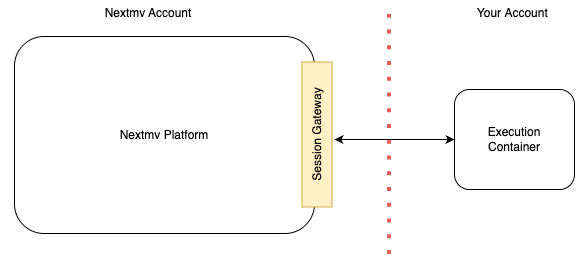
The Nextmv control plane manages the execution of customer models by deploying and orchestrating containers within the user's own cloud environment.
Execution flow:
- Initiation: When a user requests a run, the Nextmv control plane initiates a new container in the user's account, referencing the configured integration.
- Driver & Security: Each container includes a specialized driver that is capable of communicating with the Nextmv control plane. The control plane provides the container with session-specific information at initiation, including a temporary, session-scoped security token used for all session interactions.
- Core Operations: Operating entirely within the customer's account boundary, the container's driver performs the following sequence:
- Retrieves the necessary model and data from the Nextmv platform.
- Executes the model.
- Returns the results to the Nextmv platform.
- Session Termination: Upon completion of the session, the access token automatically expires, invalidating further access to the Nextmv platform.
The Nextmv driver is a small, versatile binary executable, supporting both AMD64 and ARM64 architectures. When your container starts, its entrypoint logic initiates the driver. The Nextmv control plane supplies the necessary arguments to the container, which the driver uses to establish communication and context with the Nextmv platform.
The Nextmv driver maintains data isolation: it only transmits the final results, specifically the data located in the user-defined output location, back to the Nextmv platform upon the run's completion. The driver must have outbound access to the Nextmv session gateway domain on port 443 (HTTPS) in order to correctly operate.
Databricks Integration Overview
Nextmv can use a Databricks Job as a compute target for its integration.
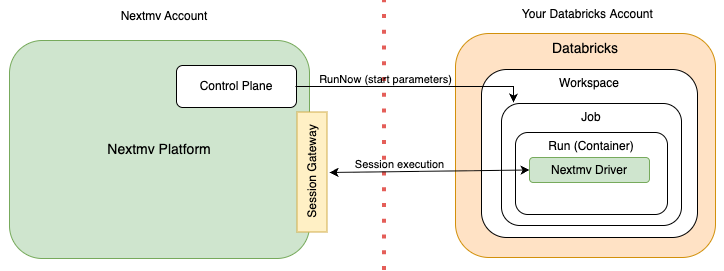
The integration relies upon several Databricks concepts:
- A Job is an execution boundary for a workload, running on a specified container or a predefined Databricks environment.
- A Run is the execution of a workload within a Job, and aligns directly with a run in Nextmv.
- A Service Principal is a secure identity that is assumable by the Nextmv platform using OAuth.
The Databricks integration operates as follows:
- Job Submission: When you initiate a run in Nextmv using this integration, Nextmv assumes the Service Principal using the OAuth client credential flow and creates a run on the Databricks Job specifying session related parameters.
- Run Execution: Once the job starts, the Nextmv driver processes the parameters submitted at run initiation to execute the specific run session, and runs the session protocol with the session gateway.
- Cancellation: If a Databricks run is canceled from within the Nextmv platform, the driver will terminate within 30 seconds of either the cancelation request.
To set up an integration you create a Job and a Service Principal within your Databricks workspace. The Service Principal must be granted permission to manage runs within the job. You then configure an integration in your Nextmv account with the relevant information, including the workspace, job, and service principal details. This configuration information is stored securely as an encrypted secret in Nextmv.
For details on getting started with Databricks compute integration, see the Databricks compute tutorial.
AWS Batch Integration Overview
Nextmv uses an AWS Batch job queue and job definition as a compute integration target. The AWS Batch service handles provisioning of compute resources based upon Fargate or EC2 for executing container workloads.
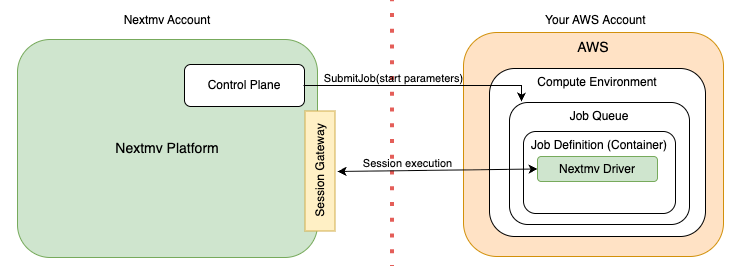
The integration relies upon several AWS Batch concepts:
- A Job Definition defines the container and resources to be used by a Job. The Nextmv driver is installed onto the container image referenced by the definition.
- A Job Queue manages the scheduling and execution of a job, using the container defined by a Job Definition.
- A Job is a unit of work to run within a container. A run in Nextmv maps 1:1 with a Job.
- A Cross-Account Role is an AWS IAM role assumable by the Nextmv account to submit Jobs to the Job Queue using the Job Definition.
The Nextmv AWS Batch integration operates as follows:
- Job Submission: When you initiate a run in Nextmv using this integration, Nextmv assumes the cross-account role and submits a job to your configured AWS Batch Job Queue and Job Definition.
- Run Execution: Once the job starts, the Nextmv driver processes the parameters submitted at job initiation to execute the specific run session, and runs the session protocol with the session gateway.
- Cancellation: If a Batch run is canceled from within the Nextmv platform, the driver will terminate immediately, typically within 30 seconds of the cancellation request.
To facilitate the setup, Nextmv provides a Python-based AWS CDK project. This code enables you to establish the batch installation within your own AWS account and gives you control over configuring the resources for the AWS Batch Job Queue and Job Definition. The source code includes a simple Dockerfile definition. This serves as a starting point for creating the container image used by the Job Definition and as a reference for setting up the Nextmv driver in the container. You can extend this Dockerfile to build a container that meets your needs. The installation also creates the cross-account role.
After completing the CDK installation you configure an integration in your Nextmv account with your Job Queue, Job Definition, and cross-account Role ARN. Nextmv internally creates another AWS Role that is allowed to assume the cross-account role you provided. This information is stored in an encrypted secret within Nextmv.
For details on getting started with AWS Batch compute integration, see the AWS Batch compute tutorial.