Orchestrate Multiple Models

Orchestrate multiple models together with Nextpipe

A tutorial to explore the Nextmv Platform with Nextpipe, a framework for decision workflows.

βŒ›οΈ Approximate time to complete: 25 min.

In this tutorial you will learn how to orchestrate multiple decision models together with the Nextmv Platform from scratch, using Nextpipe.

πŸ’‘ From now on, running multiple decision models is going to be known as a decision workflow.

Complete this tutorial if you:

  • Are interested in orchestrating decision workflows with the Nextmv Platform and Nextpipe.
  • Are fluent using Python 🐍.

To complete this tutorial, we will use an external example, working under the principle that it is not a Nextmv-created decision workflow. You can, and should, use your own decision workflow, or follow along with the example provided:

At a high level, this tutorial will go through the following steps using the example:

  1. Nextmv-ify the decision workflow.
  2. Run it locally.
  3. Push the workflow to Nextmv Cloud.
  4. Run the workflow remotely.

Let’s dive right in 🀿.

1. Prepare the executable code

If you are working with your own decision workflow and already know that it executes, feel free to skip this step.

The decision workflow is composed of one, or more, executables that solve optimization problems. The original example is a Jupyter notebook that can be broken down into two distinct parts:

  1. A statistical model that predicts avocado demand based on price and other features.

  2. An optimization model that determines the optimal price and supply of avocados based on the predicted demand.

For simplicity, we copied the cells of the notebook into a single script. Copy the desired example code to a script named main.py.

import warnings

import gurobipy as gp
import matplotlib.pyplot as plt
import pandas as pd
import seaborn as sns
import statsmodels.formula.api as smf
from gurobipy import GRB
from ipywidgets import interact
from sklearn.metrics import r2_score
from sklearn.model_selection import train_test_split

warnings.filterwarnings("ignore")

avocado = pd.read_csv(
    "https://raw.githubusercontent.com/Gurobi/modeling-examples/master/price_optimization/HABdata_2019_2022.csv"
)  # dataset downloaded directly from HAB
# avocado = pd.read_csv('HABdata_2019_2022.csv') # dataset downloaded directly from HAB
avocado_old = pd.read_csv(
    "https://raw.githubusercontent.com/Gurobi/modeling-examples/master/price_optimization/kaggledata_till2018.csv"
)  # dataset downloaded from Kaggle
# avocado_old = pd.read_csv('kaggledata_till2018.csv') # dataset downloaded from Kaggle
avocado = pd.concat([avocado, avocado_old], ignore_index=True)
avocado

# Add the index for each year from 2015 through 2022
avocado["date"] = pd.to_datetime(avocado["date"])
avocado["year"] = pd.DatetimeIndex(avocado["date"]).year
avocado["year_index"] = avocado["year"] - 2015
avocado = avocado.sort_values(by="date")

# Define the peak season
avocado["month"] = pd.DatetimeIndex(avocado["date"]).month
peak_months = range(2, 8)  # <--------- Set the months for the "peak season"


def peak_season(row):
    return 1 if int(row["month"]) in peak_months else 0


avocado["peak"] = avocado.apply(lambda row: peak_season(row), axis=1)

# Scale the number of avocados to millions
avocado["units_sold"] = avocado["units_sold"] / 1000000

# Select only conventional avocados
avocado = avocado[avocado["type"] == "Conventional"]

avocado = avocado[
    ["date", "units_sold", "price", "region", "year", "month", "year_index", "peak"]
].reset_index(drop=True)

avocado

df_Total_US = avocado[avocado["region"] == "Total_US"]

fig, axes = plt.subplots(nrows=1, ncols=1, figsize=(10, 5))

mean = df_Total_US.groupby("year")["units_sold"].mean()
std = df_Total_US.groupby("year")["units_sold"].std()
axes.errorbar(mean.index, mean, xerr=0.5, yerr=2 * std, linestyle="")
axes.set_ylabel("Units Sold (millions)")
axes.set_xlabel("Year")

fig.tight_layout()

fig, axes = plt.subplots(nrows=1, ncols=1, figsize=(10, 5))

mean = df_Total_US.groupby("month")["units_sold"].mean()
std = df_Total_US.groupby("month")["units_sold"].std()

axes.errorbar(mean.index, mean, xerr=0.5, yerr=2 * std, linestyle="")
axes.set_ylabel("Units Sold (millions)")
axes.set_xlabel("Month")

fig.tight_layout()

plt.xlabel("Month")
axes.set_xticks(range(1, 13))
plt.ylabel("Units sold (millions)")
plt.show()

fig, axes = plt.subplots(nrows=1, ncols=1, figsize=(15, 5))
sns.heatmap(
    df_Total_US[["units_sold", "price", "year", "peak"]].corr(),
    annot=True,
    center=0,
    ax=axes,
)

axes.set_title("Correlations for conventional avocados")
plt.show()

fig, axes = plt.subplots(nrows=1, ncols=1, figsize=(10, 5))

regions = [
    "Great_Lakes",
    "Midsouth",
    "Northeast",
    "Northern_New_England",
    "SouthCentral",
    "Southeast",
    "West",
    "Plains",
]
df = avocado[avocado.region.isin(regions)]

mean = df.groupby("region")["units_sold"].mean()
std = df.groupby("region")["units_sold"].std()

axes.errorbar(range(len(mean)), mean, xerr=0.5, yerr=2 * std, linestyle="")

fig.tight_layout()

plt.xlabel("Region")
plt.xticks(range(len(mean)), pd.DataFrame(mean)["units_sold"].index, rotation=20)
plt.ylabel("Units sold (millions)")
plt.show()


# Split the data for training and testing
train, test = train_test_split(df, train_size=0.8, random_state=1)
df_train = pd.DataFrame(train, columns=df.columns)
df_test = pd.DataFrame(test, columns=df.columns)

# Train the model
formula = "units_sold ~ price + year_index + C(region)+ peak"
mod = smf.ols(formula, data=df_train)
result = mod.fit()
result.summary()

# Get R^2 from test data
y_true = df_test["units_sold"]
y_pred = result.predict(df_test)
print("The R^2 value in the test set is", r2_score(y_true, y_pred))

formula = "units_sold ~ price + year_index + C(region)+ peak"
mod_full = smf.ols(formula, data=df)
result_full = mod_full.fit()

y_true_full = df["units_sold"]
y_pred_full = result_full.predict(df)
print("The R^2 value in the full dataset is", r2_score(y_true_full, y_pred_full))

# Get the weights and store it
coef_dict = result_full.params.to_dict()
coef_dict["C(region)[T.Great_Lakes]"] = 0
print(coef_dict)

m = gp.Model("Avocado_Price_Allocation")

# Sets and parameters
R = regions  # set of all regions

B = 30  # total amount ot avocado supply

peak_or_not = 1  # 1 if it is the peak season; 1 if isn't
year = 2022

c_waste = 0.1  # the cost ($) of wasting an avocado
c_transport = {
    "Great_Lakes": 0.3,
    "Midsouth": 0.1,
    "Northeast": 0.4,
    "Northern_New_England": 0.5,
    "SouthCentral": 0.3,
    "Southeast": 0.2,
    "West": 0.2,
    "Plains": 0.2,
}
# the cost of transporting an avocado

# Get the lower and upper bounds from the dataset for the price and the number of products to be stocked
a_min = {r: 0 for r in R}  # minimum avocado price in each region
a_max = {r: 2 for r in R}  # maximum avocado price in each region
b_min = dict(
    df.groupby("region")["units_sold"].min()
)  # minimum number of avocados allocated to each region
b_max = dict(
    df.groupby("region")["units_sold"].max()
)  # maximum number of avocados allocated to each region

p = m.addVars(R, name="p", lb=a_min, ub=a_max)  # price of avocados in each region
x = m.addVars(R, name="x", lb=b_min, ub=b_max)  # quantity supplied to each region
s = m.addVars(
    R, name="s", lb=0
)  # predicted amount of sales in each region for the given price
w = m.addVars(R, name="w", lb=0)  # excess wasteage in each region

d = {
    r: (
        coef_dict["Intercept"]
        + coef_dict["price"] * p[r]
        + coef_dict["C(region)[T.%s]" % r]
        + coef_dict["year_index"] * (year - 2015)
        + coef_dict["peak"] * peak_or_not
    )
    for r in R
}
for r in R:
    print(d[r])

m.setObjective(sum(p[r] * s[r] - c_waste * w[r] - c_transport[r] * x[r] for r in R))
m.ModelSense = GRB.MAXIMIZE

m.addConstr(sum(x[r] for r in R) == B)
m.update()

m.addConstrs((s[r] <= x[r] for r in R))
m.addConstrs((s[r] <= d[r] for r in R))
m.update()

m.addConstrs((w[r] == x[r] - s[r] for r in R))
m.update()

m.Params.NonConvex = 2
m.optimize()

solution = pd.DataFrame()
solution["Region"] = R
solution["Price"] = [p[r].X for r in R]
solution["Allocated"] = [round(x[r].X, 8) for r in R]
solution["Sold"] = [round(s[r].X, 8) for r in R]
solution["Wasted"] = [round(w[r].X, 8) for r in R]
solution["Pred_demand"] = [
    (
        coef_dict["Intercept"]
        + coef_dict["price"] * p[r].X
        + coef_dict["C(region)[T.%s]" % r]
        + coef_dict["year_index"] * (year - 2015)
        + coef_dict["peak"] * peak_or_not
    )
    for r in R
]

opt_revenue = m.ObjVal
print("\n The optimal net revenue: $%f million" % opt_revenue)
solution

fig, ax = plt.subplots(1, 1)
plot_sol = sns.scatterplot(data=solution, x="Price", y="Sold", hue="Region", s=100)
plot_waste = sns.scatterplot(
    data=solution, x="Price", y="Wasted", marker="x", hue="Region", s=100, legend=False
)

plot_sol.legend(loc="center left", bbox_to_anchor=(1.25, 0.5), ncol=1)
plot_waste.legend(loc="center left", bbox_to_anchor=(1.25, 0.5), ncol=1)
plt.ylim(0, 5)
plt.xlim(1, 2.2)
ax.set_xlabel("Price per avocado ($)")
ax.set_ylabel("Number of avocados sold (millions)")
plt.show()
print(
    "The circles represent sales quantity and the cross markers represent the wasted quantity."
)


peak_or_not = 1  #
year = 2021

# Sets and parameters
R = regions
c_waste = 0.1
c_transport = {
    "Great_Lakes": 0.3,
    "Midsouth": 0.1,
    "Northeast": 0.4,
    "Northern_New_England": 0.5,
    "SouthCentral": 0.3,
    "Southeast": 0.2,
    "West": 0.2,
    "Plains": 0.2,
}

# Get the lower and upper bounds for price (p) and amount to be stocked (x) from the dataset
price_min = dict(df.groupby("region")["price"].min())
price_max = dict(df.groupby("region")["price"].max())
sold_min = dict(df.groupby("region")["units_sold"].min())
sold_max = dict(df.groupby("region")["units_sold"].max())


def solve_MIQP(x):
    B = x

    # Initialize Model
    m = gp.Model("Avocado_Price_Allocation")

    # Variables. Adjust the bounds here
    x = m.addVars(R, name="x", lb=sold_min, ub=sold_max)
    p = m.addVars(R, name="p", lb=0, ub=2)
    s = m.addVars(R, name="s", lb=0)
    w = m.addVars(R, name="w", lb=0)
    _ = m.addVars(R, name="i", vtype=GRB.BINARY)

    # Predictor expression for demand
    d = {
        r: (
            coef_dict["Intercept"]
            + coef_dict["price"] * p[r]
            + coef_dict["C(region)[T.%s]" % r]
            + coef_dict["year_index"] * (year - 2015)
            + coef_dict["peak"] * peak_or_not
        )
        for r in R
    }

    # Set the objective
    m.ModelSense = GRB.MAXIMIZE
    m.setObjective(sum(p[r] * s[r] - c_waste * w[r] - c_transport[r] * x[r] for r in R))

    # Add the constraints
    m.addConstrs((s[r] <= x[r] for r in R))
    m.addConstrs((s[r] <= d[r] for r in R))
    m.addConstrs((x[r] == w[r] + s[r] for r in R))
    m.addConstr(sum(x[r] for r in R) == B)

    # Solve
    m.setParam("OutputFlag", 0)
    m.Params.NonConvex = 2
    m.update()
    m.optimize()
    if m.status == 4:
        print("The problem is infeasible. Try changing the parameter values.")
    else:
        global solution, opt_revenue
        solution = pd.DataFrame()
        solution["Region"] = R
        solution["Price"] = [p[r].X for r in R]
        solution["Allocated"] = [round(x[r].X, 8) for r in R]
        solution["Sold"] = [round(s[r].X, 8) for r in R]
        solution["Wasted"] = [round(w[r].X, 8) for r in R]
        solution["Demand"] = [
            (
                coef_dict["Intercept"]
                + coef_dict["price"] * p[r].X
                + coef_dict["C(region)[T.%s]" % r]
                + coef_dict["year_index"] * (year - 2015)
                + coef_dict["peak"] * peak_or_not
            )
            for r in R
        ]

        opt_revenue = m.ObjVal
        if display_figures:
            print("\n Net revenue: $%f million" % opt_revenue)
            print(
                "\nThe optimal solution is as follows. Price per avocado in dollars. Allocated avocados, wasted avocados, and predicted demand in millions.\n"
            )
            print(solution)

            print(
                "\n Scatter plot of price vs number of avocados sold (millions) for the eight regions:"
            )
            fig, ax = plt.subplots(1, 1)
            plot_sol = sns.scatterplot(
                data=solution, x="Price", y="Sold", hue="Region", s=100
            )
            plot_waste = sns.scatterplot(
                data=solution,
                x="Price",
                y="Wasted",
                marker="x",
                hue="Region",
                s=100,
                legend=False,
            )

            plot_sol.legend(loc="center left", bbox_to_anchor=(1.25, 0.5), ncol=1)
            plot_waste.legend(loc="center left", bbox_to_anchor=(1.25, 0.5), ncol=1)
            plt.ylim(0, 5)
            plt.xlim(1, 2.2)
            ax.set_xlabel("Price per avocado ($)")
            ax.set_ylabel("Number of avocados sold (millions)")
            plt.show()
            print(
                "The circles represent sales quantity and the cross markers represent the wasted quantity."
            )

        return m.ObjVal, solution


display_figures = 1
print("Select a value for the available inventory (B) (in millions):\n")
interact(solve_MIQP, x=(15, 40, 1))


df_subset = df[(df["year"] == year) & (df["peak"] == peak_or_not)]
df_subset["price_minus_transport"] = df_subset["price"] - df_subset["region"].map(
    c_transport
)
dates = sorted(list(set(df_subset.date)))

# Run the optimizer for each week
actual, optimal, display_figures = [], [], 0
for date in dates:
    df_date = df_subset[df_subset["date"] == date]
    weekly_sold = (df_date["units_sold"]).values.sum()
    optimal.append(solve_MIQP(weekly_sold)[0])

    actual_weekly_revenue = (
        df_date["units_sold"] * (df_date["price_minus_transport"])
    ).values.sum()
    actual.append(actual_weekly_revenue)

# Plot the two scatter plots
fig_comparison, ax_comparison = plt.subplots(1, 1)
actual_plot = plt.scatter(dates, actual)
optimal_plot = plt.scatter(dates, optimal)
plt.legend(
    (optimal_plot, actual_plot),
    ("Optimal weekly net revenue", "Actual weekly net revenue"),
    loc="center left",
    bbox_to_anchor=(1.25, 0.5),
    ncol=1,
)
x_ticks_labels = list(dict.fromkeys([date.strftime("%B") for date in dates]))
ax_comparison.set_xticklabels(x_ticks_labels, rotation=20, fontsize=12)
ax_comparison.set_xlabel("Date")
ax_comparison.set_ylabel("Net revenue in $million")

plt.show()

difference = [(i - j) / j for i, j in zip(optimal, actual)]
print(
    "For the average peak season week in %i, the optimal solution yields %f %% more net revenue than the actual supply chain."
    % (year, 100 * sum(difference) / len(difference))
)


def compare_with_actual(x):
    df_date = df_subset[df_subset["date"] == x]
    weekly_sold = (df_date["units_sold"]).values.sum()
    print(weekly_sold)
    opt_revenue, opt_solution = solve_MIQP(weekly_sold)
    df_comparison = df_date.merge(opt_solution, left_on="region", right_on="Region")
    df_comparison = df_comparison[["Region", "price", "Price", "units_sold", "Sold"]]
    df_comparison = df_comparison.rename(
        {
            "price": "Actual price",
            "Price": "Optimal price",
            "units_sold": "Actual sold",
            "Sold": "Optimal sold",
        },
        axis=1,
    )
    print(df_comparison.sort_values(by="Region").reset_index(drop=True))


display_figures = 0
print("Select a value for the available inventory (B) (in millions):\n")
interact(compare_with_actual, x=dates)

gp.disposeDefaultEnv()
Copy

2. Install requirements

If you are working with your own decision workflow and already have all requirements ready for it, feel free to skip this step.

Make sure you have the appropriate requirements installed for your workflow. If you don’t have one already, create a requirements.txt file in the root of your project with the Python package requirements needed.

gurobipy>=13.0.0
matplotlib>=3.10.7
pandas>=2.3.3
seaborn>=0.13.2
statsmodels>=0.14.5
ipywidgets>=8.1.8
scikit-learn>=1.7.2
Copy

Install the requirements by running the following command:

pip install -r requirements.txt
Copy

3. Run the executable code

If you are working with your own decision workflow and already know that it executes, feel free to skip this step.

Make sure your decision model works by running the executable code.

$ python main.py
The R^2 value in the test set is 0.8982069358257861
The R^2 value in the full dataset is 0.9066729322212482
{'Intercept': 5.439310052165037, 'C(region)[T.Midsouth]': -0.2426931536778842, 'C(region)[T.Northeast]': 1.4330198366432345, 'C(region)[T.Northern_New_England]': -3.0192437906378973, 'C(region)[T.Plains]': -1.8150328723904134, 'C(region)[T.SouthCentral]': 1.7138120739734481, 'C(region)[T.Southeast]': 0.5839901666611709, 'C(region)[T.West]': 2.6017994486412617, 'price': -2.2037701048902405, 'year_index': 0.16076930231844397, 'peak': 0.5485105058308412, 'C(region)[T.Great_Lakes]': 0}
Restricted license - for non-production use only - expires 2027-11-29
7.113205674224986 + -2.2037701048902405 <gurobi.Var *Awaiting Model Update*>
6.870512520547102 + -2.2037701048902405 <gurobi.Var *Awaiting Model Update*>
8.54622551086822 + -2.2037701048902405 <gurobi.Var *Awaiting Model Update*>
4.093961883587088 + -2.2037701048902405 <gurobi.Var *Awaiting Model Update*>
8.827017748198433 + -2.2037701048902405 <gurobi.Var *Awaiting Model Update*>
7.697195840886157 + -2.2037701048902405 <gurobi.Var *Awaiting Model Update*>
9.715005122866247 + -2.2037701048902405 <gurobi.Var *Awaiting Model Update*>
5.298172801834572 + -2.2037701048902405 <gurobi.Var *Awaiting Model Update*>
Set parameter NonConvex to value 2
Gurobi Optimizer version 13.0.0 build v13.0.0rc1 (mac64[arm] - Darwin 24.6.0 24G325)

CPU model: Apple M1 Max
Thread count: 10 physical cores, 10 logical processors, using up to 10 threads

Non-default parameters:
NonConvex  2

Optimize a model with 25 rows, 32 columns and 64 nonzeros (Max)
Model fingerprint: 0x1105370c
Model has 16 linear objective coefficients
Model has 8 quadratic objective terms
Coefficient statistics:
  Matrix range     [1e+00, 2e+00]
  Objective range  [1e-01, 5e-01]
  QObjective range [2e+00, 2e+00]
  Bounds range     [2e-01, 1e+01]
  RHS range        [4e+00, 3e+01]

Continuous model is non-convex -- solving as a MIP

Presolve removed 8 rows and 8 columns
Presolve time: 0.00s
Presolved: 34 rows, 34 columns, 81 nonzeros
Presolved model has 8 bilinear constraint(s)
Variable types: 34 continuous, 0 integer (0 binary)
Found heuristic solution: objective 42.5082914

Root relaxation: objective 5.288486e+01, 36 iterations, 0.00 seconds (0.00 work units)

    Nodes    |    Current Node    |     Objective Bounds      |     Work
 Expl Unexpl |  Obj  Depth IntInf | Incumbent    BestBd   Gap | It/Node Time

     0     0   52.88486    0    8   42.50829   52.88486  24.4%     -    0s
     0     0   47.12254    0    8   42.50829   47.12254  10.9%     -    0s
     0     0   47.11204    0    8   42.50829   47.11204  10.8%     -    0s
     0     0   43.44566    0    8   42.50829   43.44566  2.21%     -    0s
     0     0   43.22891    0    8   42.50829   43.22891  1.70%     -    0s
     0     0   42.82675    0    7   42.50829   42.82675  0.75%     -    0s
     0     0   42.65288    0    6   42.50829   42.65288  0.34%     -    0s
     0     0   42.53457    0    4   42.50829   42.53457  0.06%     -    0s
     0     0   42.51399    0    4   42.50829   42.51399  0.01%     -    0s

Cutting planes:
  RLT: 14

Explored 1 nodes (98 simplex iterations) in 0.01 seconds (0.00 work units)
Thread count was 10 (of 10 available processors)

Solution count 1: 42.5083 

Optimal solution found (tolerance 1.00e-04)
Best objective 4.250829143843e+01, best bound 4.251247911519e+01, gap 0.0099%

 The optimal net revenue: $42.508291 million
The circles represent sales quantity and the cross markers represent the wasted quantity.
Select a value for the available inventory (B) (in millions):

 Net revenue: $41.127592 million

The optimal solution is as follows. Price per avocado in dollars. Allocated avocados, wasted avocados, and predicted demand in millions.

                 Region     Price  Allocated      Sold        Wasted    Demand
0           Great_Lakes  1.680635   3.248703  3.248703  0.000000e+00  3.248703
1              Midsouth  1.525572   3.347733  3.347733  1.000000e-08  3.347733
2             Northeast  2.000000   3.977916  3.977916  0.000000e+00  3.977916
3  Northern_New_England  1.368205   0.917984  0.917984  0.000000e+00  0.917984
4          SouthCentral  2.000000   4.258708  4.258708  0.000000e+00  4.258708
5             Southeast  1.763133   3.650886  3.650886  0.000000e+00  3.650886
6                  West  2.000000   5.146696  5.146696  0.000000e+00  5.146696
7                Plains  1.218834   2.451375  2.451375  0.000000e+00  2.451375

 Scatter plot of price vs number of avocados sold (millions) for the eight regions:
The circles represent sales quantity and the cross markers represent the wasted quantity.
(41.127592131950266,                  Region     Price  Allocated      Sold        Wasted    Demand
0           Great_Lakes  1.680635   3.248703  3.248703  0.000000e+00  3.248703
1              Midsouth  1.525572   3.347733  3.347733  1.000000e-08  3.347733
2             Northeast  2.000000   3.977916  3.977916  0.000000e+00  3.977916
3  Northern_New_England  1.368205   0.917984  0.917984  0.000000e+00  0.917984
4          SouthCentral  2.000000   4.258708  4.258708  0.000000e+00  4.258708
5             Southeast  1.763133   3.650886  3.650886  0.000000e+00  3.650886
6                  West  2.000000   5.146696  5.146696  0.000000e+00  5.146696
7                Plains  1.218834   2.451375  2.451375  0.000000e+00  2.451375)
interactive(children=(IntSlider(value=27, description='x', max=40, min=15), Output()), _dom_classes=('widget-interact',))
For the average peak season week in 2021, the optimal solution yields 35.288636 % more net revenue than the actual supply chain.
Select a value for the available inventory (B) (in millions):

46.198996519999994
                 Region  Actual price  Optimal price  Actual sold  Optimal sold
0           Great_Lakes      0.795779       1.527396     5.534257      3.586407
1              Midsouth      0.887154       1.472333     5.237337      3.465060
2             Northeast      1.037254       1.902525     7.307711      4.192728
3  Northern_New_England      0.879489       1.368205     0.737616      0.917984
4                Plains      0.834592       1.115594     2.819025      2.678890
5          SouthCentral      0.649054       1.916232     7.989053      4.443313
6             Southeast      0.815569       1.659894     7.322009      3.878402
7                  West      0.833758       2.000000     9.251989      5.146696
Freeing default Gurobi environment

Copy

Note that this code in particular produces interactive plots.

4. Nextmv-ify the decision workflow

We are going to turn the executable decision workflow into multiple Nextmv applications.

So, what is a Nextmv application? A Nextmv application is an entity that contains a decision model as executable code. An application can make a run by taking an input, executing the decision model, and producing an output. An application is defined by its code, and a configuration file named app.yaml, known as the "app manifest".

Think of the app as a shell, or workspace, that contains your decision model code, and provides the necessary structure to run it.

A run on a Nextmv application follows this convention:
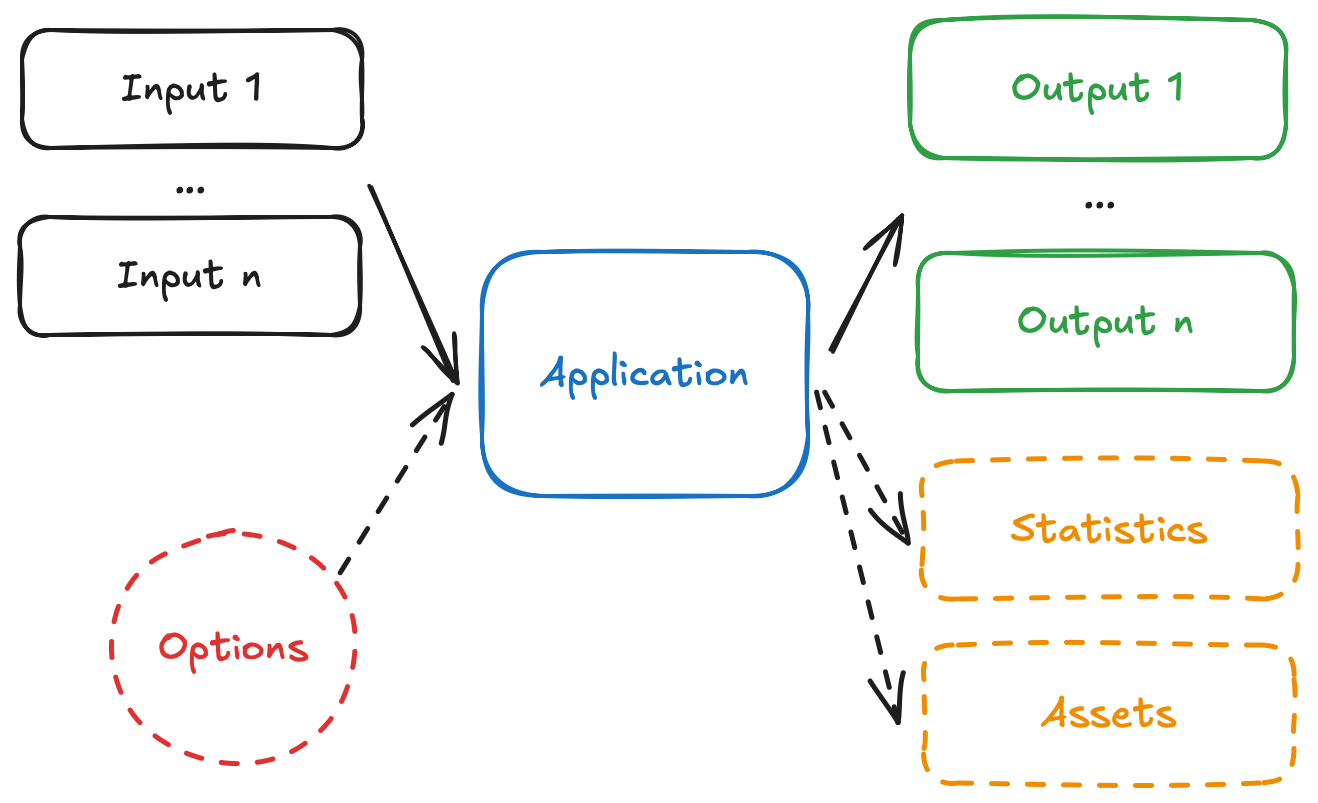
App diagram

  • The app receives one, or more, inputs (problem data), through stdin or files.
  • The app run can be configured through options, that are received as CLI arguments.
  • The app processes the inputs, and executes the decision model.
  • The app produces one, or more, outputs (solutions), and prints to stdout or files.
  • The app optionally produces statistics (metrics) and assets (can be visual, like charts).

We are going to turn the Gurobi example into three distinct Nextmv applications:

  1. A regression application that will predict demand based on historical data. This application will output the regression coefficients.
  2. A decision application that will receive the regression coefficients, alongside more input data, and will solve the optimization model to decide on pricing and avocado allocation.
  3. A workflow application that will orchestrate the previous two applications, running them in sequence to produce a final solution.

Each of the applications will follow Nextmv conventions. The following diagram shows the general idea of the three applications interacting:

Workflow diagram

  • The workflow app receives the initial input data.
  • The workflow app runs the regression app, passing it the historical data.
  • The regression app produces the regression coefficients as output.
  • The workflow app then runs the decision app, passing it the regression coefficients, alongside other input data.
  • The decision app produces the final solution as output, and is returned by the workflow app.

4.1. The regression application

Create a new directory named regression, and cd into it. Start by adding the app.yaml file, which is known as the app manifest, to the root of the directory. This file contains the configuration of the app.

type: python
runtime: ghcr.io/nextmv-io/runtime/python:3.11
files:
  - main.py
python:
  pip-requirements: requirements.txt
configuration:
  content:
    format: multi-file
    multi-file:
      input:
        path: inputs
      output:
        solutions: outputs/solutions
        statistics: outputs/statistics/statistics.json
        assets: outputs/assets/assets.json
  options:
    items:
      - name: train_size
        description: Proportion of data to use for training
        required: false
        option_type: float
        default: 0.8
        additional_attributes:
          min: 0.1
          max: 0.9
          step: 0.1
        ui:
          control_type: slider
          display_name: Training Size
      - name: random_state
        description: Random seed for train-test split
        required: false
        option_type: int
        default: 1
        additional_attributes:
          min: 0
          max: 100
          step: 1
        ui:
          control_type: slider
          display_name: Random Seed
Copy

This tutorial is not meant to discuss the app manifest in-depth, for that you can go to the manifest docs. However, these are the main attributes shown in the manifest:

  • type: It is a python application.
  • runtime: This application uses the standard python:3.11 runtime.
  • files: contains files that make up the executable code of the app. In this case only a single main.py file is needed. Make sure to include all files and dirs that are needed for your decision model.
  • python.pip-requirements: specifies the file with the Python packages that need to be installed for the application.
  • configuration.content: This application will use multi-file, so additional configurations are needed. As you complete this tutorial, the difference between this format, and json will become clearer.
  • configuration.options: for this example, we are adding options to the application, which allow you to configure runs, with parameters such as the training size and random seed.

For this example, a dependency for nextmv (the Nextmv Python SDK) is also added. This dependency is optional, and SDK modeling constructs are not needed to run a Nextmv Application. However, using the SDK modeling features makes it easier to work with Nextmv apps, as a lot of convenient functionality is already baked in, like:

  • Reading and interpreting the manifest.
  • Easily reading and writing files based on the content format.
  • Parsing and using options from the command line, or environment variables.
  • Structuring inputs and outputs.

Because we are only working with the regression, we have reduced dependencies. These are the requirements.txt for the regression app.

nextmv>=0.36.0
pandas>=2.3.3
statsmodels>=0.14.5
scikit-learn>=1.7.2

Copy

Now, you can add the main.py script with the Nextmv-ified regression.

import nextmv
import pandas as pd
import statsmodels.formula.api as smf
from sklearn.metrics import r2_score
from sklearn.model_selection import train_test_split


def fit(input: nextmv.Input) -> nextmv.Output:
    options = input.options
    avocado = input.data["avocado"]

    # Add the index for each year from 2015 through 2022
    avocado["date"] = pd.to_datetime(avocado["date"])
    avocado["year"] = pd.DatetimeIndex(avocado["date"]).year
    avocado["year_index"] = avocado["year"] - input.data["input"]["initial_year"]
    avocado = avocado.sort_values(by="date")

    # Define the peak season
    avocado["month"] = pd.DatetimeIndex(avocado["date"]).month
    pm = input.data["input"]["peak_months"]
    peak_months = range(pm[0], pm[1])  # <--------- Set the months for the "peak season"

    def peak_season(row):
        return 1 if int(row["month"]) in peak_months else 0

    avocado["peak"] = avocado.apply(lambda row: peak_season(row), axis=1)

    # Scale the number of avocados to millions
    avocado["units_sold"] = avocado["units_sold"] / 1_000_000

    # Select only conventional avocados
    avocado = avocado[avocado["type"] == "Conventional"]

    avocado = avocado[
        ["date", "units_sold", "price", "region", "year", "month", "year_index", "peak"]
    ].reset_index(drop=True)

    regions = input.data["input"]["regions"]
    df = avocado[avocado.region.isin(regions)]

    # Split the data for training and testing
    train, test = train_test_split(
        df, train_size=options.train_size, random_state=options.random_state
    )
    df_train = pd.DataFrame(train, columns=df.columns)
    df_test = pd.DataFrame(test, columns=df.columns)

    # Train the model
    formula = "units_sold ~ price + year_index + C(region)+ peak"
    mod = smf.ols(formula, data=df_train)
    result = mod.fit()

    # Get R^2 from test data
    y_true = df_test["units_sold"]
    y_pred = result.predict(df_test)
    r2_test = r2_score(y_true, y_pred)
    print("The R^2 value in the test set is", r2_test)

    formula = "units_sold ~ price + year_index + C(region)+ peak"
    mod_full = smf.ols(formula, data=df)
    result_full = mod_full.fit()

    y_true_full = df["units_sold"]
    y_pred_full = result_full.predict(df)
    r2_full = r2_score(y_true_full, y_pred_full)
    print("The R^2 value in the full dataset is", r2_full)

    # Get the weights and store it
    coef_dict = result_full.params.to_dict()
    coef_dict["C(region)[T.Great_Lakes]"] = 0

    return nextmv.Output(
        output_format=nextmv.OutputFormat.MULTI_FILE,
        options=options,
        solution_files=[nextmv.json_solution_file("coefficients.json", data=coef_dict)],
        statistics=nextmv.Statistics(
            result=nextmv.ResultStatistics(
                custom={
                    "r2_test": r2_test,
                    "r2_full": r2_full,
                },
            ),
        ),
    )


if __name__ == "__main__":
    manifest = nextmv.Manifest.from_yaml(".")
    options = manifest.extract_options()

    def loader(file_path: str) -> pd.DataFrame:
        return pd.read_csv(file_path)

    input = nextmv.load(
        input_format=nextmv.InputFormat.MULTI_FILE,
        options=options,
        path="inputs",
        data_files=[
            nextmv.json_data_file(name="input", input_data_key="input"),
            nextmv.DataFile(
                name="avocado.csv",
                loader=loader,
                input_data_key="avocado",
            ),
        ],
    )
    output = fit(input)
    nextmv.write(output=output, path="outputs")
Copy

This is a short summary of the changes introduced for this application:

  • Load the app manifest from the app.yaml file.
  • Extract options (configurations) from the manifest.
  • The input data is no longer fetched from the Python file itself. We are representing the problem with several files under the inputs directory. In inputs/avocado.csv we are going to write the complete dataset of sold avocados. In inputs/input.json we are going to write general information needed for the model, like the regions, peak months, and the initial year. When working with more than one file, the multi-file content format is ideal. We use the Python SDK to load the input data from the various files.
  • Modify the definition of variables to use data from the loaded inputs.
  • Store the solution to the problem, and solver metrics (statistics), in an output.
  • Write the output to several files, under the outputs directory, given that we are working with the multi-file content format.

After you are done Nextmv-ifying, your Nextmv app should have the following structure, for the example provided.

.
β”œβ”€β”€ app.yaml
β”œβ”€β”€ main.py
└── requirements.txt
Copy

4.2. The decision application

Create a new directory named decision, and cd into it. Start by adding the app.yaml file (app manifest) to the root of the directory.

type: python
runtime: ghcr.io/nextmv-io/runtime/python:3.11
files:
  - main.py
python:
  pip-requirements: requirements.txt
configuration:
  content:
    format: multi-file
    multi-file:
      input:
        path: inputs
      output:
        solutions: outputs/solutions
        statistics: outputs/statistics/statistics.json
        assets: outputs/assets/assets.json
Copy

The attributes shown in the manifest are largely the same as the ones exposed in the regression app. For simplicity, this app does not contain options (configurations).

For this example, the same nextmv dependency is introduced. Similarly to the regression app, we have reduced dependencies. These are the requirements.txt for the decision app.

gurobipy>=13.0.0
nextmv>=0.36.0
pandas>=2.3.3
Copy

Now, you can add the main.py script with the Nextmv-ified decision model.

import gurobipy as gp
import nextmv
import pandas as pd
from gurobipy import GRB


def solve(input: nextmv.Input) -> nextmv.Output:
    options = input.options
    avocado = input.data["avocado"]

    # Add the index for each year from 2015 through 2022
    avocado["date"] = pd.to_datetime(avocado["date"])
    avocado["year"] = pd.DatetimeIndex(avocado["date"]).year
    avocado["year_index"] = avocado["year"] - input.data["input"]["initial_year"]
    avocado = avocado.sort_values(by="date")

    # Define the peak season
    avocado["month"] = pd.DatetimeIndex(avocado["date"]).month
    pm = input.data["input"]["peak_months"]
    peak_months = range(pm[0], pm[1])  # <--------- Set the months for the "peak season"

    def peak_season(row):
        return 1 if int(row["month"]) in peak_months else 0

    avocado["peak"] = avocado.apply(lambda row: peak_season(row), axis=1)

    # Scale the number of avocados to millions
    avocado["units_sold"] = avocado["units_sold"] / 1_000_000

    # Select only conventional avocados
    avocado = avocado[avocado["type"] == "Conventional"]

    avocado = avocado[
        ["date", "units_sold", "price", "region", "year", "month", "year_index", "peak"]
    ].reset_index(drop=True)

    regions = input.data["input"]["regions"]
    df = avocado[avocado.region.isin(regions)]

    m = gp.Model("Avocado_Price_Allocation")

    # Sets and parameters
    R = regions  # set of all regions

    B = input.data["input"]["B"]  # total amount ot avocado supply

    # 1 if it is the peak season; 1 if isn't
    peak_or_not = input.data["input"]["peak_or_not"]
    year = input.data["input"]["year"]

    c_waste = input.data["input"]["cost_waste"]  # the cost ($) of wasting an avocado
    c_transport = input.data["input"]["cost_transport"]
    # the cost of transporting an avocado

    # Get the lower and upper bounds from the dataset for the price and the number of products to be stocked
    # minimum avocado price in each region
    a_min = {r: input.data["input"]["a_min"] for r in R}
    # maximum avocado price in each region
    a_max = {r: input.data["input"]["a_max"] for r in R}
    b_min = dict(
        df.groupby("region")["units_sold"].min()
    )  # minimum number of avocados allocated to each region
    b_max = dict(
        df.groupby("region")["units_sold"].max()
    )  # maximum number of avocados allocated to each region

    p = m.addVars(R, name="p", lb=a_min, ub=a_max)  # price of avocados in each region
    x = m.addVars(R, name="x", lb=b_min, ub=b_max)  # quantity supplied to each region
    s = m.addVars(
        R, name="s", lb=0
    )  # predicted amount of sales in each region for the given price
    w = m.addVars(R, name="w", lb=0)  # excess wasteage in each region

    coef_dict = input.data["coefficients"]
    d = {
        r: (
            coef_dict["Intercept"]
            + coef_dict["price"] * p[r]
            + coef_dict["C(region)[T.%s]" % r]
            + coef_dict["year_index"] * (year - 2015)
            + coef_dict["peak"] * peak_or_not
        )
        for r in R
    }
    for r in R:
        print(d[r])

    m.setObjective(sum(p[r] * s[r] - c_waste * w[r] - c_transport[r] * x[r] for r in R))
    m.ModelSense = GRB.MAXIMIZE

    m.addConstr(sum(x[r] for r in R) == B)
    m.update()

    m.addConstrs((s[r] <= x[r] for r in R))
    m.addConstrs((s[r] <= d[r] for r in R))
    m.update()

    m.addConstrs((w[r] == x[r] - s[r] for r in R))
    m.update()

    m.Params.NonConvex = 2
    m.optimize()

    solution = pd.DataFrame()
    solution["Region"] = R
    solution["Price"] = [p[r].X for r in R]
    solution["Allocated"] = [round(x[r].X, 8) for r in R]
    solution["Sold"] = [round(s[r].X, 8) for r in R]
    solution["Wasted"] = [round(w[r].X, 8) for r in R]
    solution["Pred_demand"] = [
        (
            coef_dict["Intercept"]
            + coef_dict["price"] * p[r].X
            + coef_dict["C(region)[T.%s]" % r]
            + coef_dict["year_index"] * (year - 2015)
            + coef_dict["peak"] * peak_or_not
        )
        for r in R
    ]

    opt_revenue = m.ObjVal
    print("\n The optimal net revenue: $%f million" % opt_revenue)
    solution

    return nextmv.Output(
        output_format=nextmv.OutputFormat.MULTI_FILE,
        options=options,
        solution_files=[
            nextmv.json_solution_file(
                name="solution.json",
                data={"solution": solution.to_dict(orient="records")},
            )
        ],
        statistics=nextmv.Statistics(
            result=nextmv.ResultStatistics(
                value=opt_revenue,
                duration=m.Runtime,
                custom={
                    "status": m.Status,
                    "variables": m.NumVars,
                    "constraints": m.NumConstrs,
                },
            ),
        ),
    )


if __name__ == "__main__":
    manifest = nextmv.Manifest.from_yaml(".")
    options = manifest.extract_options()

    def loader(file_path: str) -> pd.DataFrame:
        return pd.read_csv(file_path)

    input = nextmv.load(
        input_format=nextmv.InputFormat.MULTI_FILE,
        options=options,
        path="inputs",
        data_files=[
            nextmv.json_data_file(name="coefficients", input_data_key="coefficients"),
            nextmv.json_data_file(name="input", input_data_key="input"),
            nextmv.DataFile(
                name="avocado.csv",
                loader=loader,
                input_data_key="avocado",
            ),
        ],
    )
    output = solve(input)
    nextmv.write(output=output, path="outputs")
Copy

This is a short summary of the changes introduced for this application:

  • Load the app manifest from the app.yaml file.
  • Extract options (configurations) from the manifest.
  • The input data is represented by several files under the inputs directory. In inputs/avocado.csv we are going to have the same dataset of sold avocados. In inputs/input.json we are going to write the same general information needed for the model, plus information specific to the decision problem. Again, when working with more than one file, the multi-file content format is ideal. We use the Python SDK to load the input data from the various files.
  • Modify the definition of variables to use data from the loaded inputs.
  • Store the solution to the problem, and solver metrics (statistics), in an output.
  • Write the output to several files, under the outputs directory, given that we are working with the multi-file content format.

After you are done Nextmv-ifying, your Nextmv app should have the following structure, for the example provided.

.
β”œβ”€β”€ app.yaml
β”œβ”€β”€ main.py
└── requirements.txt
Copy

4.3. The workflow application

Create a new directory named workflow, and cd into it. Start by adding the app.yaml file (app manifest) to the root of the directory.

type: python
runtime: ghcr.io/nextmv-io/runtime/python:3.11
files:
  - main.py
python:
  pip-requirements: requirements.txt
configuration:
  content:
    format: json
Copy

This application is a bit different than the others. It uses the json content format. This means that the application should receive json data via stdin and write valid json data to stdout. For simplicity, this app does not contain options (configurations).

This application orchestrates the regression and decision applications. To achieve this, we will use nextpipe, a lightweight library for handling decision workflows. We are also going to use nextmv for the convenience in handling I/O operations.

These are the requirements.txt for the workflow app.

nextpipe>=0.4.1
nextmv>=0.36.0
pandas>=2.3.3
Copy

Now, you can add the main.py script with the decision workflow.

import json
import os
import shutil
from typing import Any

import nextmv
import pandas as pd
from nextmv import cloud
from nextpipe import FlowSpec, app, needs, step


class Workflow(FlowSpec):
    @step
    def prepare_regression_data(input: dict[str, Any]) -> str:
        """Prepares the data for the regression model."""

        # dataset downloaded directly from HAB
        avocado = pd.read_csv(input["avocado_data_path"])
        # dataset downloaded from Kaggle
        avocado_old = pd.read_csv(input["avocado_old_data_path"])

        avocado = pd.concat([avocado, avocado_old], ignore_index=True)

        # Save to inputs.
        inputs_dir = "workflow_inputs"
        os.makedirs(inputs_dir, exist_ok=True)
        avocado.to_csv(os.path.join(inputs_dir, "avocado.csv"), index=False)
        nextmv.write(input, path=os.path.join(inputs_dir, "input.json"))

        return inputs_dir

    @app(app_id="test-avocado-regression")
    @needs(predecessors=[prepare_regression_data])
    @step
    def regression() -> None:
        """Runs the regression model."""
        pass

    @needs(predecessors=[prepare_regression_data, regression])
    @step
    def prepare_decision_data(
        workflow_inputs_path: str,
        regression_results_path: str,
    ) -> str:
        """
        Prepares the data for the decision model, after completing the
        regression model.
        """

        # Copy regression coefficients to decision inputs
        decision_inputs_dir = "decision_inputs"
        os.makedirs(decision_inputs_dir, exist_ok=True)

        coeff_file = "coefficients.json"
        shutil.copy(
            os.path.join(regression_results_path, f"{coeff_file}"),
            os.path.join(decision_inputs_dir, coeff_file),
        )

        avo_file = "avocado.csv"
        shutil.copy(
            os.path.join(workflow_inputs_path, avo_file),
            os.path.join(decision_inputs_dir, avo_file),
        )

        input_file = "input.json"
        shutil.copy(
            os.path.join(workflow_inputs_path, input_file),
            os.path.join(decision_inputs_dir, input_file),
        )

        return decision_inputs_dir

    @app(app_id="test-avocado-decision", full_result=True)
    @needs(predecessors=[prepare_decision_data])
    @step
    def decision() -> None:
        """Runs the decision model."""
        pass

    @needs(predecessors=[decision])
    @step
    def resolve_output(result: cloud.RunResult) -> dict[str, Any]:
        """Writes the final output of the workflow."""

        # Extract the path to the output files.
        result_path = result.output
        # Simply copy the files from the given directory to the expected output
        # directory.
        outputs_dir = "outputs"
        os.makedirs(outputs_dir, exist_ok=True)
        for file_name in os.listdir(result_path):
            full_file_name = os.path.join(result_path, file_name)
            if os.path.isfile(full_file_name):
                shutil.copy(full_file_name, outputs_dir)

        statistics = {"statistics": result.metadata.statistics}

        solution_file = "solution.json"
        with open(os.path.join(outputs_dir, solution_file), "r") as f:
            solution_data = json.load(f)

        consolidated_output = {**solution_data, **statistics}

        return consolidated_output


def main():
    """Runs the workflow."""

    # Load input data
    input = nextmv.load()

    # Run workflow
    client = cloud.Client(api_key=os.getenv("NEXTMV_API_KEY"))
    workflow = Workflow(name="DecisionWorkflow", input=input.data, client=client)
    workflow.run()

    # Write the result
    result = workflow.get_result(workflow.resolve_output)
    nextmv.write(result)


if __name__ == "__main__":
    main()
Copy

This is a short summary of what the application does:

  • Read the input data from stdin.
  • Set up the decision workflow.
    • In the original example, the data was fetched from 2 URLs. The prepare_regression_data step downloads the data, merges it, and writes it to a workflow_inputs directory. The resulting file, named avocado.csv, is used by the subsequent steps, given that this input file is needed by both the regression and decision apps.
    • The regression step runs the regression application, using the data from the workflow_inputs directory.
    • The prepare_decision_data step prepares the inputs for the decision application. The results from the regression step (the regression coefficients) are copied to a decision_inputs directory, alongside the other input data.
    • The decision step runs the decision application, using the data from the decision_inputs directory.
    • The resolve_output step collects the results from the decision step, and writes them to an outputs directory. It consolidates the solution and statistics into a single output dictionary.
  • Write the output of the decision workflow to stdout.

To run the workflow, here is the input data that you need to place in an input.json file.

{
  "regions": [
    "Great_Lakes",
    "Midsouth",
    "Northeast",
    "Northern_New_England",
    "SouthCentral",
    "Southeast",
    "West",
    "Plains"
  ],
  "avocado_data_path": "https://raw.githubusercontent.com/Gurobi/modeling-examples/master/price_optimization/HABdata_2019_2022.csv",
  "avocado_old_data_path": "https://raw.githubusercontent.com/Gurobi/modeling-examples/master/price_optimization/kaggledata_till2018.csv",
  "initial_year": 2015,
  "peak_months": [2, 8],
  "B": 30,
  "peak_or_not": 1,
  "year": 2022,
  "cost_waste": 0.1,
  "cost_transport": {
    "Great_Lakes": 0.3,
    "Midsouth": 0.1,
    "Northeast": 0.4,
    "Northern_New_England": 0.5,
    "SouthCentral": 0.3,
    "Southeast": 0.2,
    "West": 0.2,
    "Plains": 0.2
  },
  "a_min": 0,
  "a_max": 2
}
Copy

After you are done setting up the workflow application, it should have the following structure.

.
β”œβ”€β”€ app.yaml
β”œβ”€β”€ input.json
β”œβ”€β”€ main.py
└── requirements.txt
Copy

Now you are ready to run the decision workflow πŸ₯³.

5. Create an account

The full suite of benefits starts with a Nextmv Cloud account.

  1. Visit the Nextmv Console to sign up for an account at https://cloud.nextmv.io.
  2. Verify your account.
    • You’ll receive an email asking to verify your account.
    • Follow the link in that email to sign in.
  3. Log in to your account. The Nextmv Console is ready to use!

Once you have logged in to your account, you need to fetch your API key. You can do so from your settings.

API keys

When you have your API key, it is convenient to save it as an environment variable so that you can use it for the rest of this tutorial.

export NEXTMV_API_KEY="<YOUR-API-KEY>"
Copy

6. Subscribe to a Nextmv Plan

If you already have an active Nextmv Plan, you can skip this step.

If a Nextmv member provides different instructions for activating a Nextmv Plan, please follow those instructions instead.

Running a custom application remotely in Nextmv Cloud requires a paid plan. However, plans come with a 14-day free trial that can be canceled at any time. You can upgrade your account and subscribe to a plan in Nextmv Console by clicking the Upgrade button in the header, or navigating to the Settings β†’ Plan section. Upgrading to a plan will allow you to complete the rest of the tutorial.
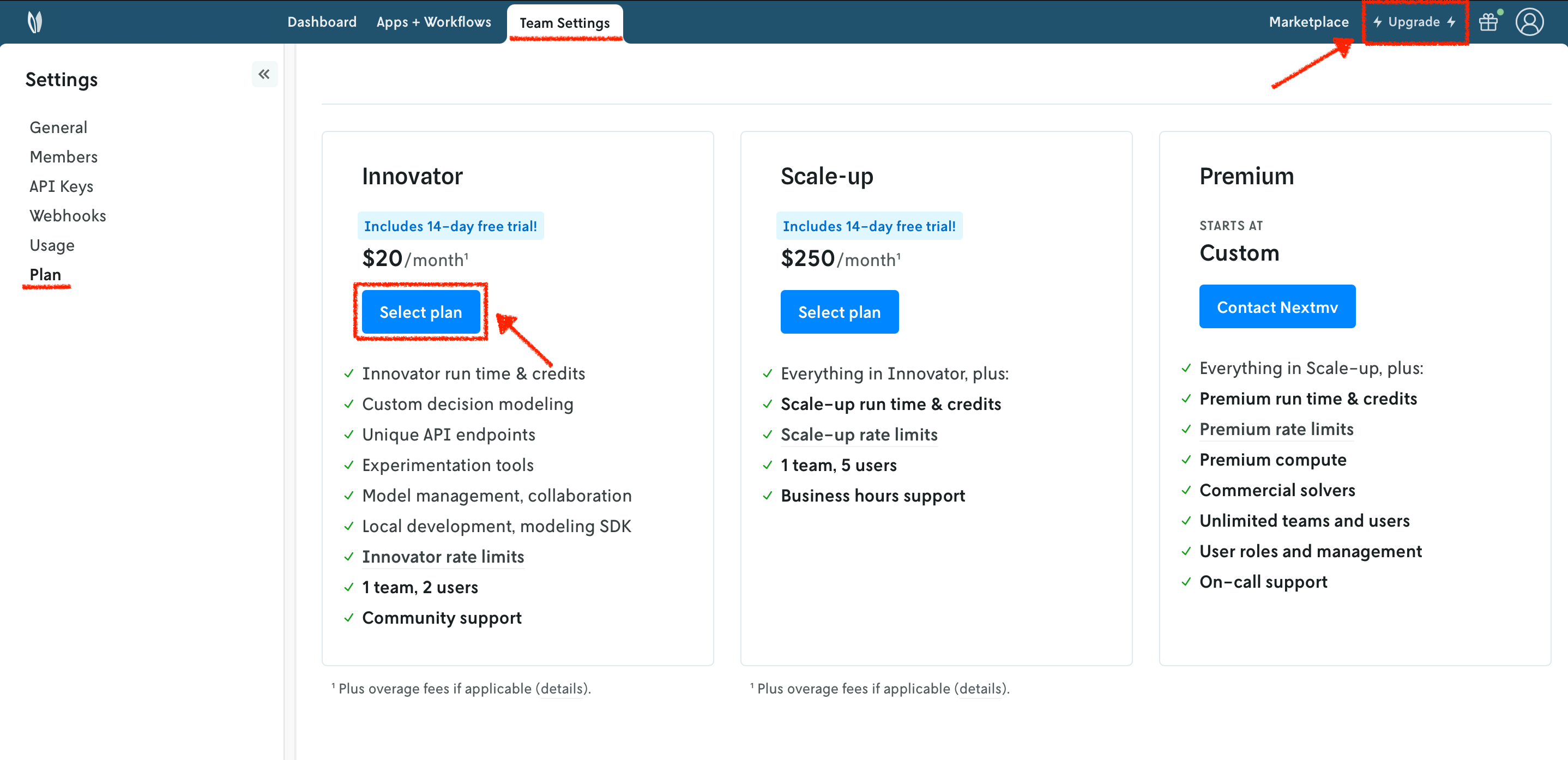
Plans

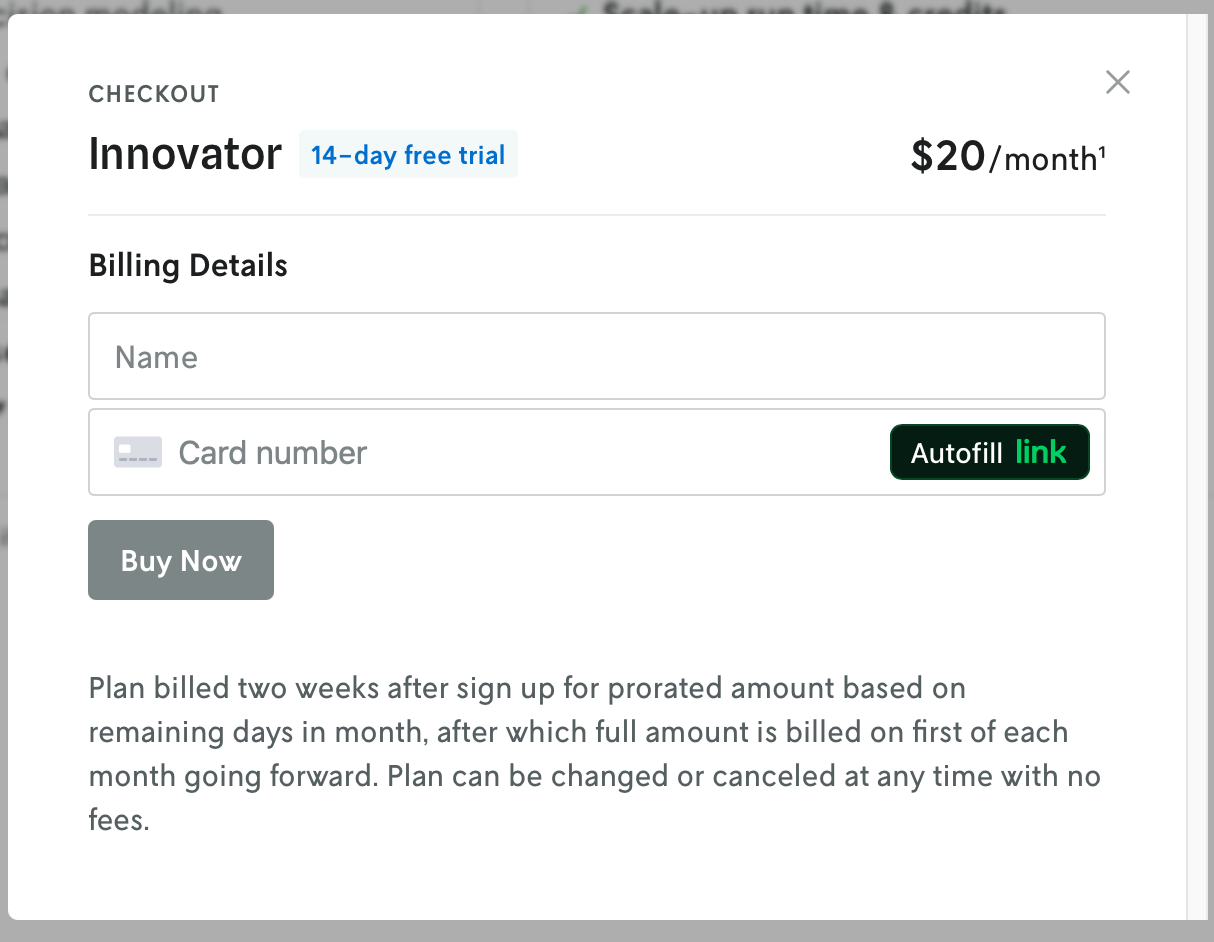
In the example shown below, you will be subscribing to an Innovator plan. A pop-up window will appear, and you will need to fill in your payment details.
Innovator

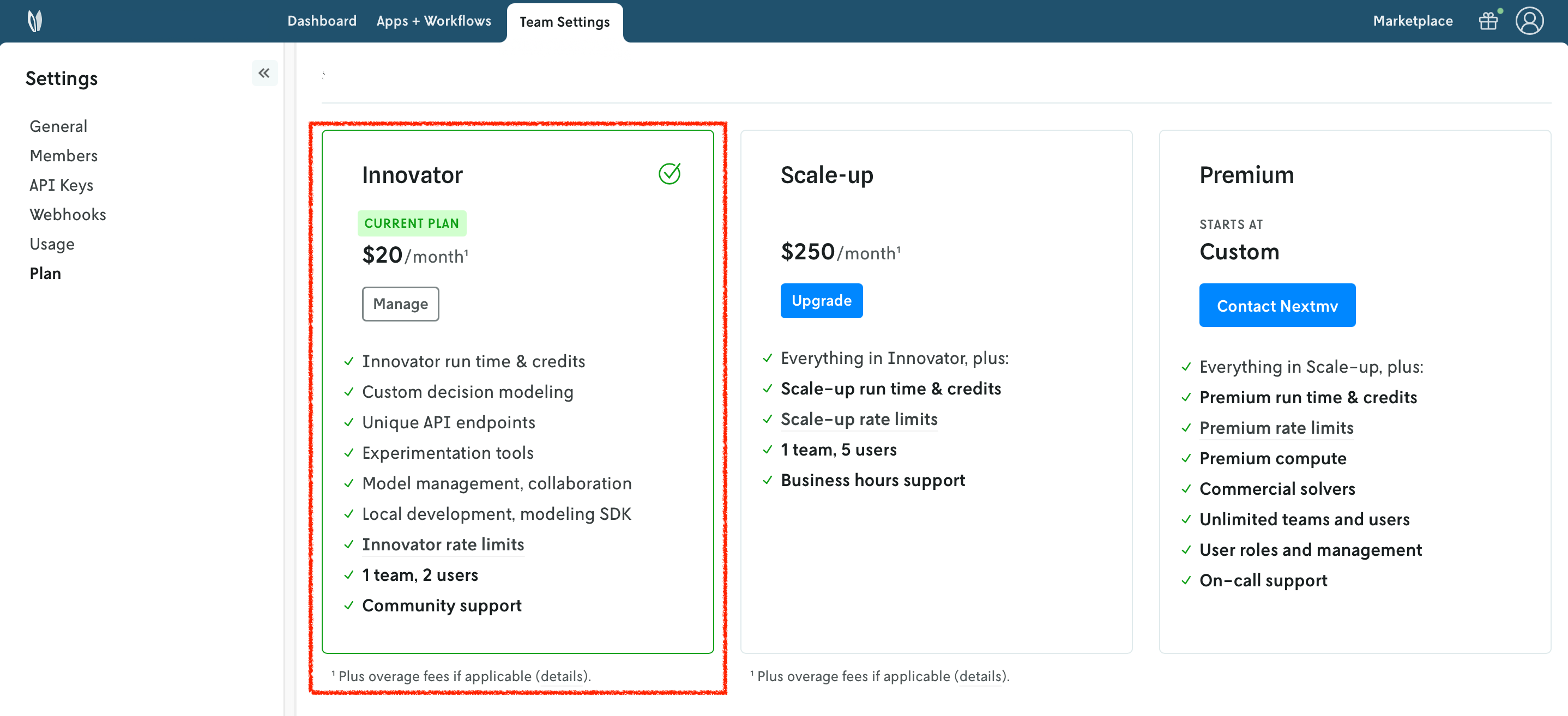
Once your account has been upgraded, you will see an active plan in your account.
Active plan

7. Install the Nextmv CLI

Run the following script to install Nextmv CLI:

export NEXTMV_BASE_URL=https://api.cloud.nextmv.io
curl -sS "https://cloud.nextmv.io/install-cli.txt" | bash -
Copy

After downloading and installing, the last step is to configure Nextmv CLI with your account:

nextmv configure --api-key $NEXTMV_API_KEY
Copy

To check if the installation was successful, run the following command to show the help menu:

nextmv --help
Copy

8. Create your Nextmv Cloud applications - regression, decision

To run the workflow, we need to create the two applications that are run as steps: regression, and decision.

Run the following command:

$ nextmv app create -a test-avocado-regression -n test-avocado-regression

{
  "id": "test-avocado-regression",
  "name": "test-avocado-regression",
  "description": "",
  "type": "custom",
  "default_instance": ""
}
Copy

This will create a new application in Nextmv Cloud for the regression model. Note that the name and app ID can be different, but for simplicity this tutorial uses the same name and app ID. This command is saved as app1.sh in the full tutorial code. You can also create applications directly from Nextmv Console.

Now, create the application for the decision model by running the following command:

$ nextmv app create -a test-avocado-decision -n test-avocado-decision

{
  "id": "test-avocado-decision",
  "name": "test-avocado-decision",
  "description": "",
  "type": "custom",
  "default_instance": ""
}
Copy

This command is saved as app2.sh in the full tutorial code.

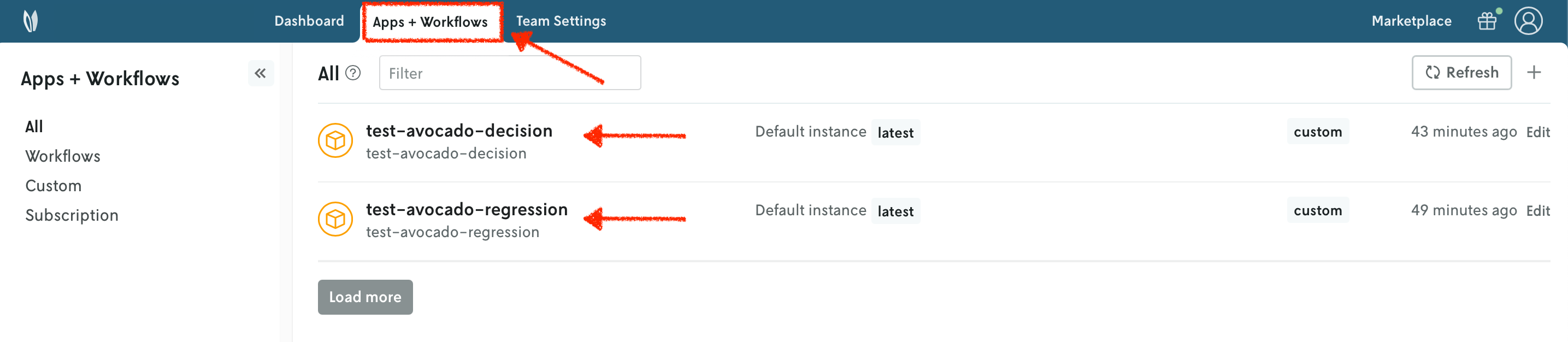
You can go to the Apps section in the Nextmv Console where you will see your applications.
Apps

9. Push your Nextmv applications - regression, decision

You are going to push your apps to Nextmv Cloud. Once an application has been pushed, you can run it remotely, perform testing, experimentation, and much more. Pushing is the equivalent of deploying an application, this is, taking the executable code and sending it to Nextmv Cloud.

cd into the regression dir, making sure you are standing in the same location as the app.yaml manifest. Deploy your regression app (push it) to Nextmv Cloud:

$ nextmv app push -a test-avocado-regression

πŸ’½ Starting build for Nextmv application.
🐍 Bundling Python dependencies.
πŸ“‹ Copied files listed in "app.yaml" manifest.
πŸ“¦ Packaged application (115.75 MiB, 13004 files).
🌟 Pushing to application: "test-avocado-regression".
πŸ’₯️ Successfully pushed to application: "test-avocado-regression".
{
  "app_id": "test-avocado-regression",
  "endpoint": "api.cloud.nextmv.io",
  "instance_url": "https://api.cloud.nextmv.io/v1/applications/test-avocado-regression/runs?instance_id=devint"
}
Copy

This command is saved as app3.sh in the full tutorial code.

Now cd into the decision dir, making sure you are standing in the same location as the app.yaml manifest. Deploy your decision app:

$ nextmv app push -a test-avocado-decision

πŸ’½ Starting build for Nextmv application.
🐍 Bundling Python dependencies.
πŸ“‹ Copied files listed in "app.yaml" manifest.
πŸ“¦ Packaged application (134.57 MiB, 6407 files).
🌟 Pushing to application: "test-avocado-decision".
πŸ’₯️ Successfully pushed to application: "test-avocado-decision".
{
  "app_id": "test-avocado-decision",
  "endpoint": "api.cloud.nextmv.io",
  "instance_url": "https://api.cloud.nextmv.io/v1/applications/test-avocado-decision/runs?instance_id=devint"
}
Copy

This command is saved as app4.sh in the full tutorial code.

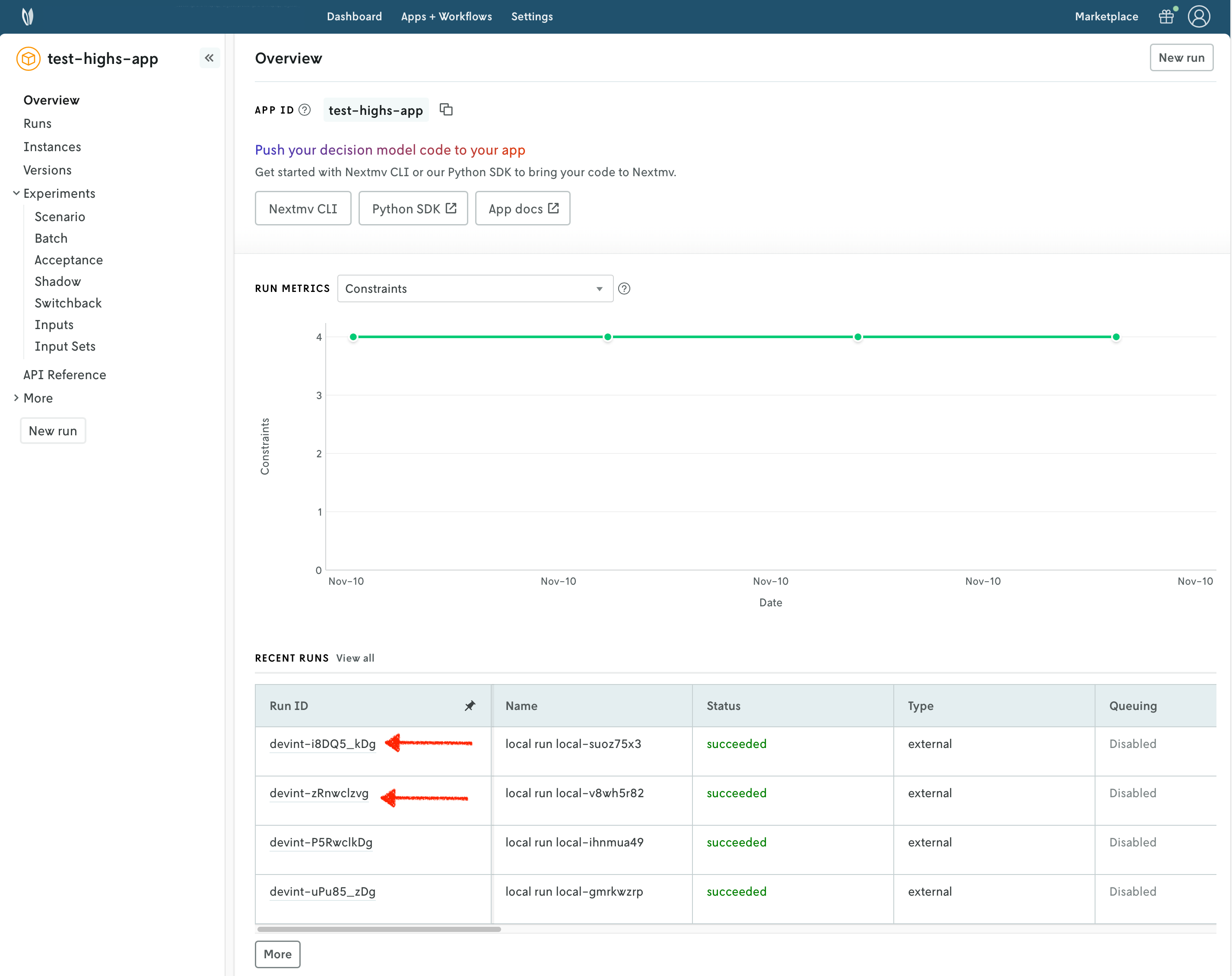
You can go to the Apps section in the Nextmv Console where you will see your applications. You can click on any of the apps to see more details. Once you are in the overview of the application in the Nextmv Console, it should show the following:
Pushed app

  • There is now a pushed executable.
  • There is an auto-created latest instance, assigned to the executable.

An instance is like the endpoint of the application.

10. Run the workflow application locally

Now that the regression and decision apps are pushed to Nextmv Cloud, you can run the workflow application locally. cd into the workflow dir, making sure you are standing in the same location as the app.yaml manifest.

10.1. Install requirements

First, install the requirements for the workflow application. You can do so by running the following command:

pip install -r requirements.txt
Copy

10.2. Run the application

The workflow application works with the json content format. This means that it reads json via stdin and it should write valid json to stdout. Run the app by executing the following command:

$ cat input.json | python main.py
[nextpipe] No application ID or run ID found, uplink is inactive.
[nextpipe] Flow: Workflow
[nextpipe] nextpipe: v0.4.1
[nextpipe] nextmv: 0.36.0
[nextpipe] Flow graph steps:
[nextpipe] Step:
[nextpipe]   Definition: Step(prepare_regression_data)
[nextpipe]   Docstring: Prepares the data for the regression model.
[nextpipe] Step:
[nextpipe]   Definition: Step(regression, StepNeeds(prepare_regression_data), StepRun(test-avocado-regression, , {}, False))
[nextpipe]   Docstring: Runs the regression model.
[nextpipe] Step:
[nextpipe]   Definition: Step(prepare_decision_data, StepNeeds(prepare_regression_data,regression))
[nextpipe]   Docstring:
        Prepares the data for the decision model, after completing the
        regression model.

[nextpipe] Step:
[nextpipe]   Definition: Step(decision, StepNeeds(prepare_decision_data), StepRun(test-avocado-decision, , {}, True))
[nextpipe]   Docstring: Runs the decision model.
[nextpipe] Step:
[nextpipe]   Definition: Step(resolve_output, StepNeeds(decision))
[nextpipe]   Docstring: Writes the final output of the workflow.
[nextpipe] Mermaid diagram:
[nextpipe] graph LR
  prepare_regression_data(prepare_regression_data)
  prepare_regression_data --> regression
  prepare_regression_data --> prepare_decision_data
  regression(regression)
  regression --> prepare_decision_data
  prepare_decision_data(prepare_decision_data)
  prepare_decision_data --> decision
  decision(decision)
  decision --> resolve_output
  resolve_output(resolve_output)

[nextpipe] Mermaid URL: https://mermaid.ink/svg/Z3JhcGggTFIKICBwcmVwYXJlX3JlZ3Jlc3Npb25fZGF0YShwcmVwYXJlX3JlZ3Jlc3Npb25fZGF0YSkKICBwcmVwYXJlX3JlZ3Jlc3Npb25fZGF0YSAtLT4gcmVncmVzc2lvbgogIHByZXBhcmVfcmVncmVzc2lvbl9kYXRhIC0tPiBwcmVwYXJlX2RlY2lzaW9uX2RhdGEKICByZWdyZXNzaW9uKHJlZ3Jlc3Npb24pCiAgcmVncmVzc2lvbiAtLT4gcHJlcGFyZV9kZWNpc2lvbl9kYXRhCiAgcHJlcGFyZV9kZWNpc2lvbl9kYXRhKHByZXBhcmVfZGVjaXNpb25fZGF0YSkKICBwcmVwYXJlX2RlY2lzaW9uX2RhdGEgLS0+IGRlY2lzaW9uCiAgZGVjaXNpb24oZGVjaXNpb24pCiAgZGVjaXNpb24gLS0+IHJlc29sdmVfb3V0cHV0CiAgcmVzb2x2ZV9vdXRwdXQocmVzb2x2ZV9vdXRwdXQpCg==?theme=dark
[nextpipe] Running node prepare_regression_data_0
[nextpipe] Running node regression_0
[nextpipe] Started app step regression_0 run, find it at https://cloud.nextmv.io/app/test-avocado-regression/run/latest-iN1iHmGDg?view=details
[nextpipe] Running node prepare_decision_data_0
[nextpipe] Running node decision_0
[nextpipe] Started app step decision_0 run, find it at https://cloud.nextmv.io/app/test-avocado-decision/run/latest-qiHWNmGDR?view=details
[nextpipe] Running node resolve_output_0
{
  "solution": [
    {
      "Region": "Great_Lakes",
      "Price": 1.6638719855250557,
      "Allocated": 3.44641434,
      "Sold": 3.44641433,
      "Wasted": 0.0,
      "Pred_demand": 3.446414334160541
    },
    {
      "Region": "Midsouth",
      "Price": 1.508808812407425,
      "Allocated": 5.27228958,
      "Sold": 3.54544477,
      "Wasted": 1.72684481,
      "Pred_demand": 3.545444765768695
    },
    {
      "Region": "Northeast",
      "Price": 1.9999999941605637,
      "Allocated": 4.13868532,
      "Sold": 4.13868531,
      "Wasted": 0.0,
      "Pred_demand": 4.138685313956469
    },
    {
      "Region": "Northern_New_England",
      "Price": 1.441156646793907,
      "Allocated": 0.91798395,
      "Sold": 0.91798395,
      "Wasted": 0.0,
      "Pred_demand": 0.9179839489187763
    },
    {
      "Region": "SouthCentral",
      "Price": 1.9999999956876244,
      "Allocated": 4.41947755,
      "Sold": 4.41947755,
      "Wasted": 0.0,
      "Pred_demand": 4.419477547921394
    },
    {
      "Region": "Southeast",
      "Price": 1.746369963576845,
      "Allocated": 3.84859793,
      "Sold": 3.84859792,
      "Wasted": 1e-08,
      "Pred_demand": 3.848597923077273
    },
    {
      "Region": "West",
      "Price": 1.9999999988886719,
      "Allocated": 5.30746493,
      "Sold": 5.30746492,
      "Wasted": 1e-08,
      "Pred_demand": 5.307464915534875
    },
    {
      "Region": "Plains",
      "Price": 1.2020702138615937,
      "Allocated": 2.64908641,
      "Sold": 2.6490864,
      "Wasted": 1e-08,
      "Pred_demand": 2.6490864005473735
    }
  ],
  "statistics": {
    "schema": "v1",
    "result": {
      "duration": 0.009085893630981445,
      "value": 42.508291438428685,
      "custom": {
        "status": 2,
        "variables": 32,
        "constraints": 25
      }
    }
  }
}
Copy

Notice that in the application logs, a URL to a mermaid diagram is provided. You can click on it to visualize the workflow executed.

Mermaid diagram

After verifying that the application runs locally, we will push it and run it remotely.

11. Create your Nextmv application - workflow

Create the application for the workflow by running the following command. Notice that we are specifying that this is a workflow by using the --flow flag.

$ nextmv app create -a test-avocado-workflow -n test-avocado-workflow --flow

{
  "id": "test-avocado-workflow",
  "name": "test-avocado-workflow",
  "description": "",
  "type": "pipeline",
  "default_instance": ""
}
Copy

This command is saved as app5.sh in the full tutorial code.

Refreshing the overview of the applications, you should now observe the workflow app listed alongside the other two applications. Notice that this app is a different type.
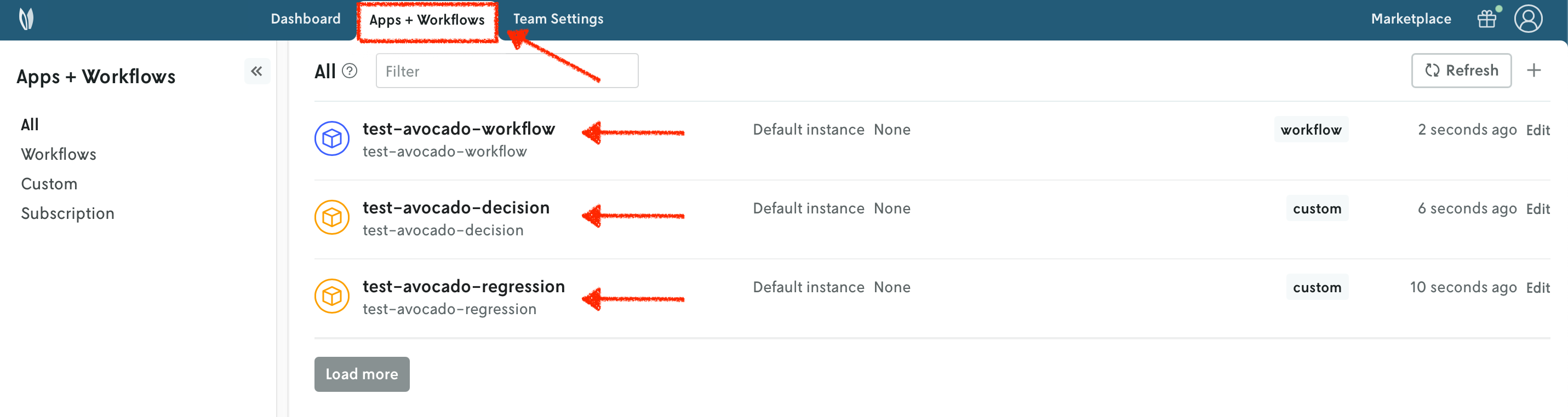
Apps

12. Push your Nextmv application - workflow

To finalize deployment, push the workflow app to Nextmv Cloud. cd into the workflow dir, making sure you are standing in the same location as the app.yaml manifest. Deploy your workflow app:

$ nextmv app push -a test-avocado-workflow

πŸ’½ Starting build for Nextmv application.
🐍 Bundling Python dependencies.
πŸ“‹ Copied files listed in "app.yaml" manifest.
πŸ“¦ Packaged application (45.19 MiB, 6502 files).
🌟 Pushing to application: "test-avocado-workflow".
πŸ’₯️ Successfully pushed to application: "test-avocado-workflow".
{
  "app_id": "test-avocado-workflow",
  "endpoint": "api.cloud.nextmv.io",
  "instance_url": "https://api.cloud.nextmv.io/v1/applications/test-avocado-workflow/runs?instance_id=devint"
}
Copy

This command is saved as app6.sh in the full tutorial code.

13. Run the Nextmv application remotely

To run the Nextmv application remotely, you have several options. For this tutorial, we will be using the Nextmv Console and CLI.

If you pay attention to the main.py of the workflow app, to run the nested Nextmv apps you use a client that needs the NEXTMV_API_KEY environment variable. Nextmv Cloud does not perform delegation, so each application is run entirely independent. To run the workflow app remotely, you must set up the NEXTMV_API_KEY environment variable as a secret.

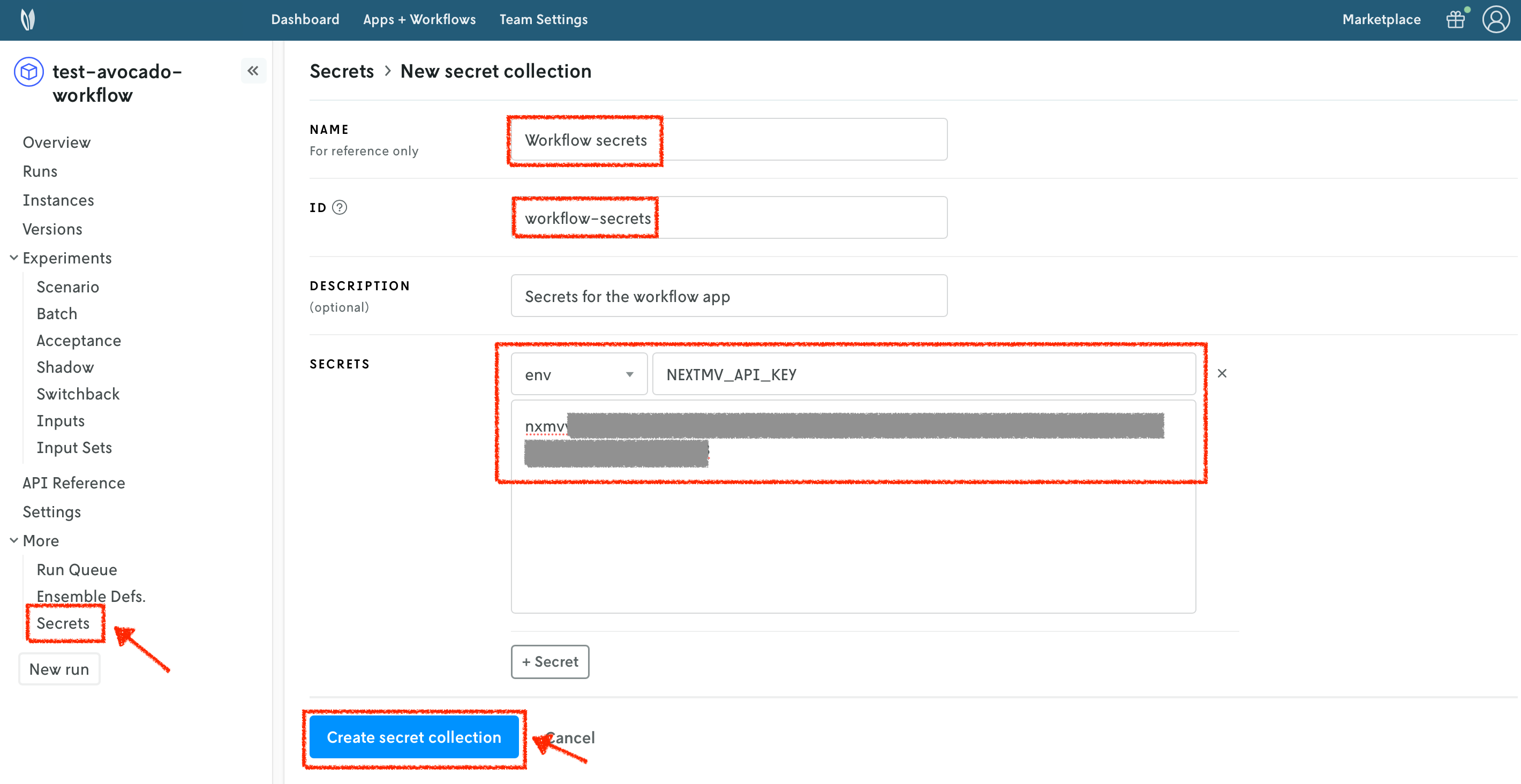
To create a secrets collection, follow these steps:

  1. Select the Secrets section of your workflow application.
  2. Press the + button to create a new secrets collection.
  3. Specify a name for your secrets collection.
  4. Assign an ID to your secrets collection.
  5. You can optionally provide a description.
  6. Add a new env secret type. The Secret location is the name of the environment variable. The Secret value is the value of the environment variable.
  7. Create the secrets collection.

Secrets collection

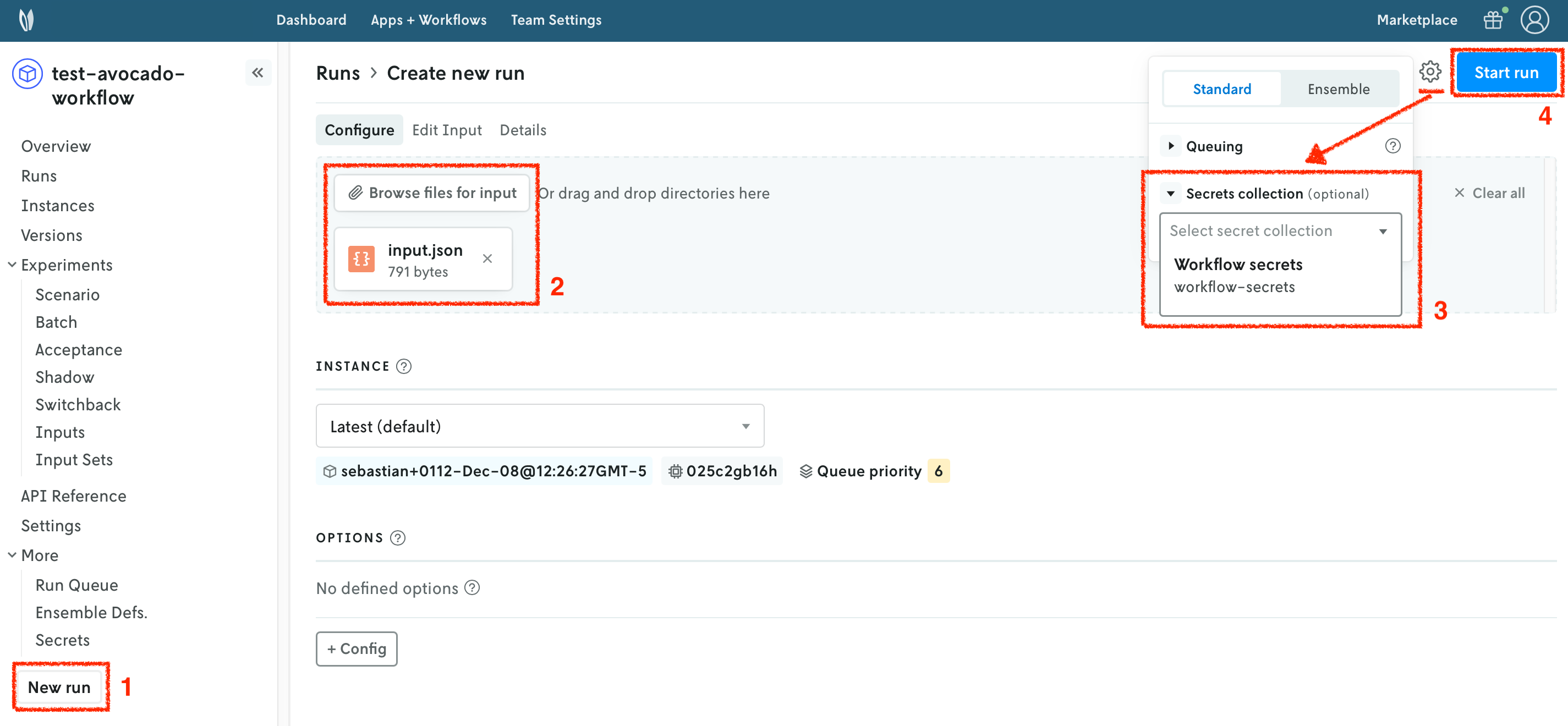
In the Nextmv Console, in the app overview page:

  1. Press the New run button.
  2. Drop the data files that you want to use. You will get a preview of the data. The file you need is the inputs.json file from the workflow application.
  3. Configure the run settings. Select the secrets collection you created in the previous step.
  4. Start the run.

New run orchestrate

You can use the Nextmv Console to browse the information of the run:

  • Summary
  • Output
  • Input
  • Metadata
  • Logs

Nextmv is built for collaboration, so you can invite team members to your account and share run URLs.
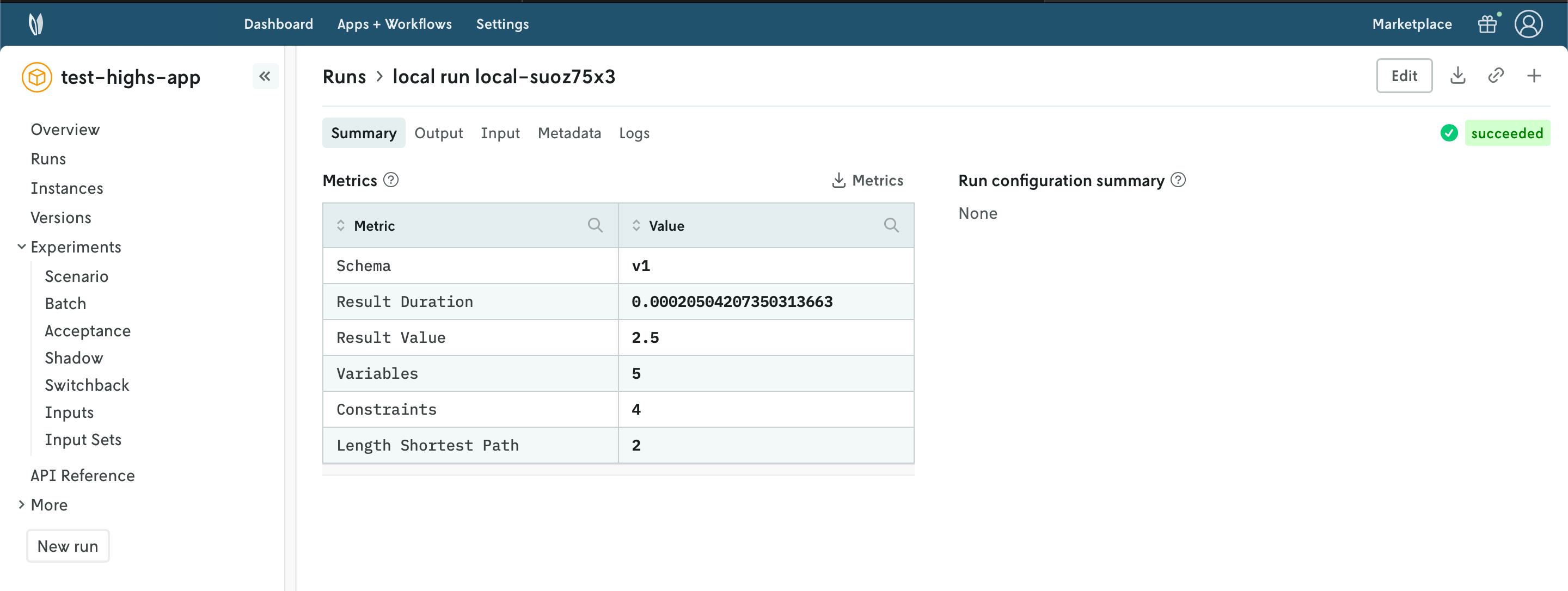
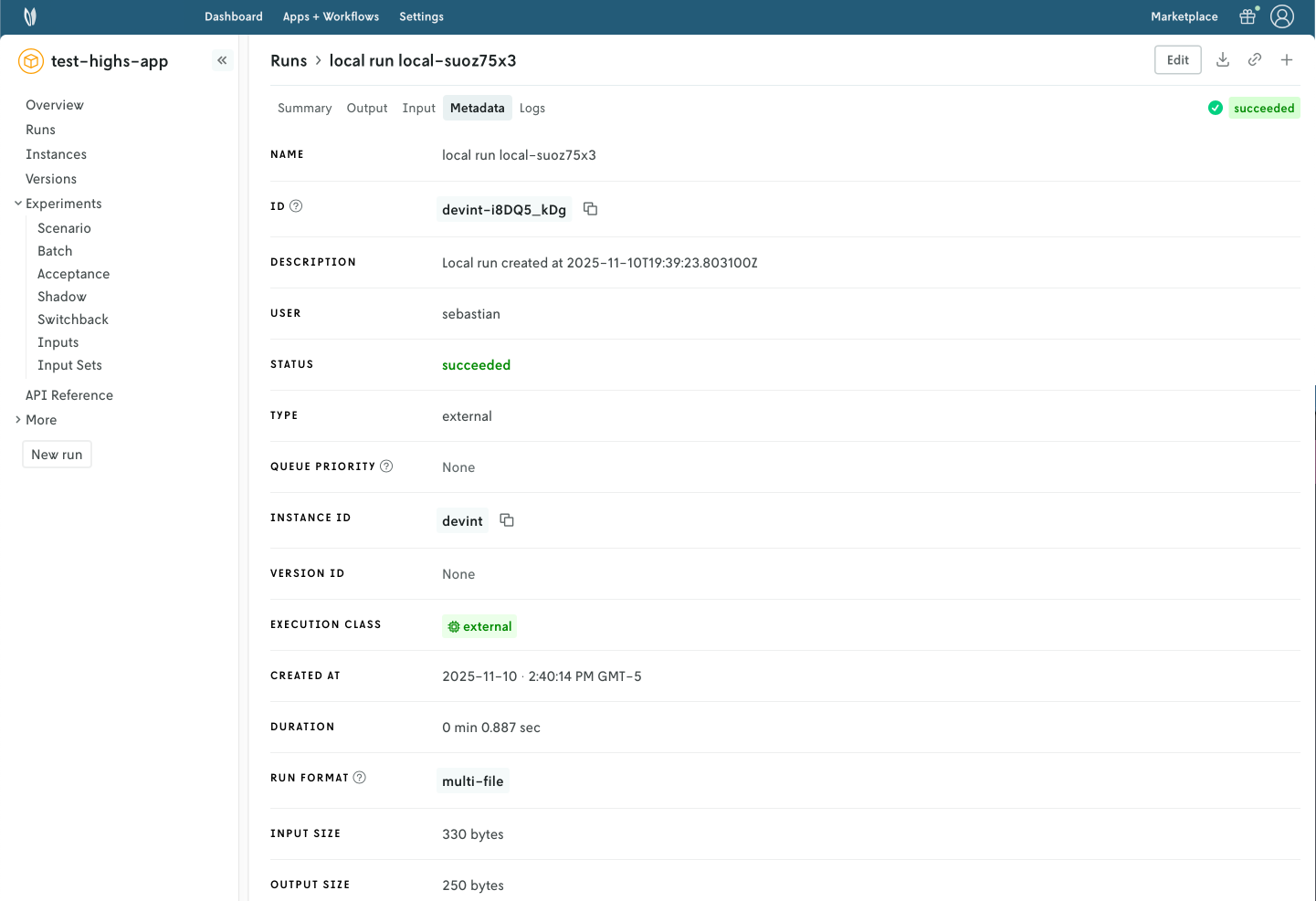
Run summary Run metadata

Workflow applications are special because they provide the Flow tab, where you can visualize the actual progress of the workflow and its steps.
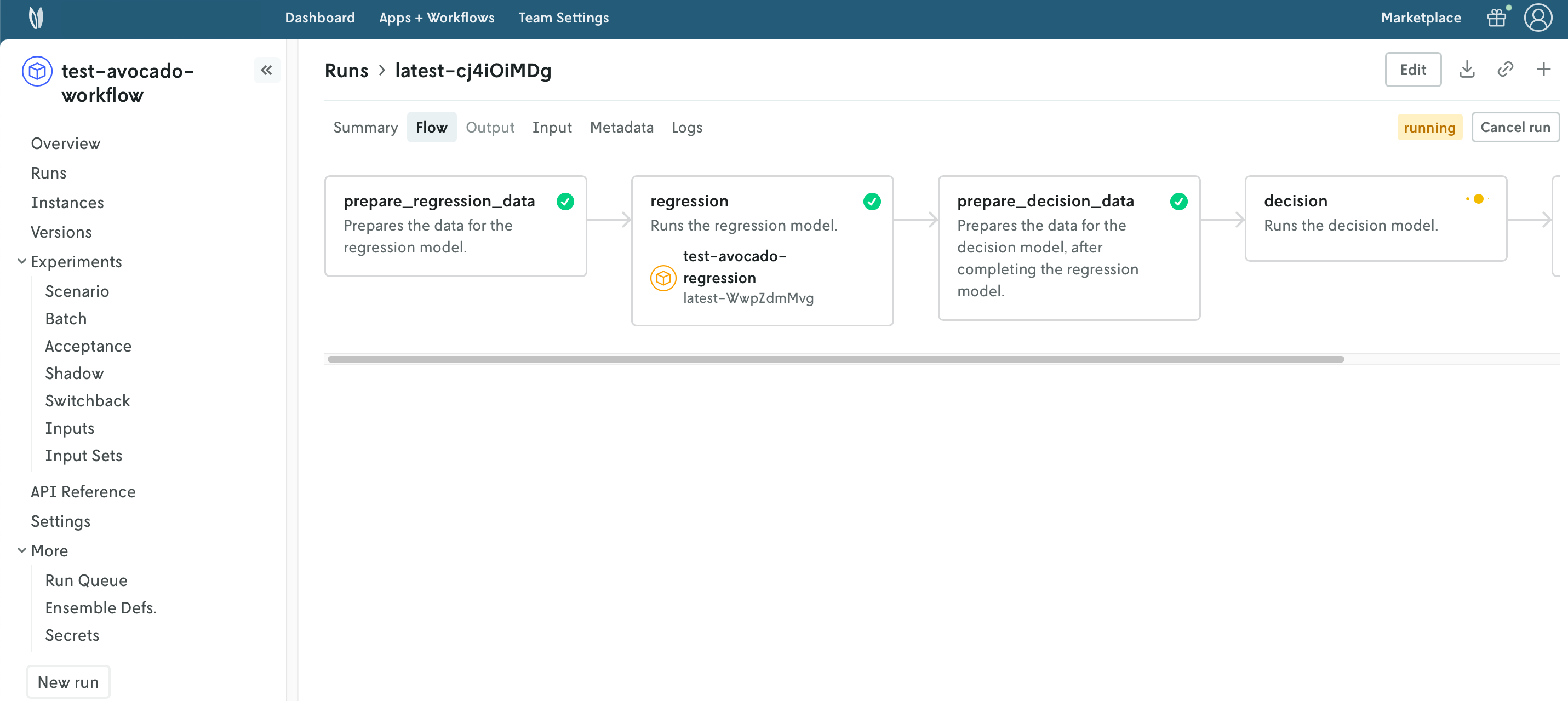
Run workflow

Alternatively, you can run your Nextmv application using the Nextmv CLI. Here is an example command you can run from the root of the app.

$ nextmv app run -a test-avocado-workflow -i input.json

{
  "run_id": "devint-jjk3M1Zvg"
}
Copy

This command is saved as app7.sh in the full tutorial code.

πŸŽ‰πŸŽ‰πŸŽ‰ Congratulations, you have finished this tutorial!

Full tutorial code

You can find the consolidated code examples used in this tutorial in the tutorials GitHub repository. The orchestrate-multiple-models dir contains all the code that was shown in this tutorial.

For the example, you will find two directories:

  • original: the original example without any modifications.
  • nextmv-ified: the example converted into the three Nextmv applications.

Go into each directory for instructions about running the decision model.

Page last updated

Go to on-page nav menu