Bring Your Model Cli

Connect your model to Nextmv with the CLI

A tutorial to explore the Nextmv Platform using a custom decision model and the CLI.

βŒ›οΈ Approximate time to complete: 20 min.

In this tutorial you will learn how to bring your own decision model to the Nextmv Platform, from scratch. Complete this tutorial if you:

  • Have a pre-existing decision model and you want to explore the Nextmv Platform.
  • Are fluent using a language of your preference, such as C++, Java, Python, etc.

To complete this tutorial, we will use two external examples, working under the principle that they are not Nextmv-created decision models. You can, and should, use your own decision model, or follow along with the examples provided:

At a high level, this tutorial will go through the following steps using both examples:

  1. Nextmv-ify the decision model.
  2. Push the model to Nextmv Cloud.
  3. Run the model remotely.
  4. Perform scenario testing.

Let’s dive right in 🀿.

1. Prepare the executable code

If you are working with your own decision model and already know that it executes, feel free to skip this step.

The decision model is composed of executable code that solves an optimization problem. Copy the desired example code to a script named main.cpp for the HiGHS example and src/main/java/com/google/ortools/constraintsolver/samples/VrpPickupDelivery.java for the OR-Tools example.

// HiGHS is designed to solve linear optimization problems of the form
//
// Min (1/2)x^TQx + c^Tx + d subject to L <= Ax <= U; l <= x <= u
//
// where A is a matrix with m rows and n columns, and Q is either zero
// or positive definite. If Q is zero, HiGHS can determine the optimal
// integer-valued solution.
//
// The scalar n is num_col_
// The scalar m is num_row_
//
// The vector c is col_cost_
// The scalar d is offset_
// The vector l is col_lower_
// The vector u is col_upper_
// The vector L is row_lower_
// The vector U is row_upper_
//
// The matrix A is represented in packed vector form, either
// row-wise or column-wise: only its nonzeros are stored
//
// * The number of nonzeros in A is num_nz
//
// * The indices of the nonnzeros in the vectors of A are stored in a_index
//
// * The values of the nonnzeros in the vectors of A are stored in a_value
//
// * The position in a_index/a_value of the index/value of the first
// nonzero in each vector is stored in a_start
//
// Note that a_start[0] must be zero
//
// The matrix Q is represented in packed column form
//
// * The dimension of Q is dim_
//
// * The number of nonzeros in Q is hessian_num_nz
//
// * The indices of the nonnzeros in the vectors of A are stored in q_index
//
// * The values of the nonnzeros in the vectors of A are stored in q_value
//
// * The position in q_index/q_value of the index/value of the first
// nonzero in each column is stored in q_start
//
// Note
//
// * By default, Q is zero. This is indicated by dim_ being initialised to zero.
//
// * q_start[0] must be zero
//
#include <cassert>

#include "Highs.h"

using std::cout;
using std::endl;

int main() {
  // Create and populate a HighsModel instance for the LP
  //
  // Min    f  =  x_0 +  x_1 + 3
  // s.t.                x_1 <= 7
  //        5 <=  x_0 + 2x_1 <= 15
  //        6 <= 3x_0 + 2x_1
  // 0 <= x_0 <= 4; 1 <= x_1
  //
  // Although the first constraint could be expressed as an upper
  // bound on x_1, it serves to illustrate a non-trivial packed
  // column-wise matrix.
  //
  HighsModel model;
  model.lp_.num_col_ = 2;
  model.lp_.num_row_ = 3;
  model.lp_.sense_ = ObjSense::kMinimize;
  model.lp_.offset_ = 3;
  model.lp_.col_cost_ = {1.0, 1.0};
  model.lp_.col_lower_ = {0.0, 1.0};
  model.lp_.col_upper_ = {4.0, 1.0e30};
  model.lp_.row_lower_ = {-1.0e30, 5.0, 6.0};
  model.lp_.row_upper_ = {7.0, 15.0, 1.0e30};
  //
  // Here the orientation of the matrix is column-wise
  model.lp_.a_matrix_.format_ = MatrixFormat::kColwise;
  // a_start_ has num_col_1 entries, and the last entry is the number
  // of nonzeros in A, allowing the number of nonzeros in the last
  // column to be defined
  model.lp_.a_matrix_.start_ = {0, 2, 5};
  model.lp_.a_matrix_.index_ = {1, 2, 0, 1, 2};
  model.lp_.a_matrix_.value_ = {1.0, 3.0, 1.0, 2.0, 2.0};
  //
  // Create a Highs instance
  Highs highs;
  HighsStatus return_status;
  //
  // Pass the model to HiGHS
  return_status = highs.passModel(model);
  assert(return_status == HighsStatus::kOk);
  // If a user passes a model with entries in
  // model.lp_.a_matrix_.value_ less than (the option)
  // small_matrix_value in magnitude, they will be ignored. A logging
  // message will indicate this, and passModel will return
  // HighsStatus::kWarning
  //
  // Get a const reference to the LP data in HiGHS
  const HighsLp& lp = highs.getLp();
  //
  // Solve the model
  return_status = highs.run();
  assert(return_status == HighsStatus::kOk);
  //
  // Get the model status
  const HighsModelStatus& model_status = highs.getModelStatus();
  assert(model_status == HighsModelStatus::kOptimal);
  cout << "Model status: " << highs.modelStatusToString(model_status) << endl;
  //
  // Get the solution information
  const HighsInfo& info = highs.getInfo();
  cout << "Simplex iteration count: " << info.simplex_iteration_count << endl;
  cout << "Objective function value: " << info.objective_function_value << endl;
  cout << "Primal  solution status: "
       << highs.solutionStatusToString(info.primal_solution_status) << endl;
  cout << "Dual    solution status: "
       << highs.solutionStatusToString(info.dual_solution_status) << endl;
  cout << "Basis: " << highs.basisValidityToString(info.basis_validity) << endl;
  const bool has_values = info.primal_solution_status;
  const bool has_duals = info.dual_solution_status;
  const bool has_basis = info.basis_validity;
  //
  // Get the solution values and basis
  const HighsSolution& solution = highs.getSolution();
  const HighsBasis& basis = highs.getBasis();
  //
  // Report the primal and solution values and basis
  for (int col = 0; col < lp.num_col_; col++) {
    cout << "Column " << col;
    if (has_values) cout << "; value = " << solution.col_value[col];
    if (has_duals) cout << "; dual = " << solution.col_dual[col];
    if (has_basis)
      cout << "; status: " << highs.basisStatusToString(basis.col_status[col]);
    cout << endl;
  }
  for (int row = 0; row < lp.num_row_; row++) {
    cout << "Row    " << row;
    if (has_values) cout << "; value = " << solution.row_value[row];
    if (has_duals) cout << "; dual = " << solution.row_dual[row];
    if (has_basis)
      cout << "; status: " << highs.basisStatusToString(basis.row_status[row]);
    cout << endl;
  }

  // Now indicate that all the variables must take integer values
  model.lp_.integrality_.resize(lp.num_col_);
  for (int col = 0; col < lp.num_col_; col++)
    model.lp_.integrality_[col] = HighsVarType::kInteger;

  highs.passModel(model);
  // Solve the model
  return_status = highs.run();
  assert(return_status == HighsStatus::kOk);
  // Report the primal solution values
  for (int col = 0; col < lp.num_col_; col++) {
    cout << "Column " << col;
    if (info.primal_solution_status)
      cout << "; value = " << solution.col_value[col];
    cout << endl;
  }
  for (int row = 0; row < lp.num_row_; row++) {
    cout << "Row    " << row;
    if (info.primal_solution_status)
      cout << "; value = " << solution.row_value[row];
    cout << endl;
  }

  highs.resetGlobalScheduler(true);

  return 0;
}
Copy

2. Set up requirements

If you are working with your own decision model and already have all requirements ready for it, feel free to skip this step.

The two examples require different setups. These are the requirements that you need before compiling and running the examples.

2.1. HiGHS

Stand at the root of the project where you placed the main.cpp file.

  • Make sure you can run g++ (C++ compiler).

  • Make sure you can run cmake (CMake build system).

  • Clone HiGHS from GitHub to build the solver.

git clone https://github.com/ERGO-Code/HiGHS.git
Copy
  • Build HiGHS, the solver itself.
cd HiGHS
cmake -S. -B build 
cmake --build build --parallel
cd ..
Copy
  • After building, a ./HiGHS/build/lib directory should exist with the necessary libraries.

2.2. OR-Tools

Stand at the root of the project where you placed the src directory.

  • Make sure you can run java (JDK 11 or higher).

  • Make sure you can run mvn (Maven).

  • Create a pom.xml file to manage dependencies.

    <?xml version="1.0" encoding="UTF-8"?>
    <project xmlns="http://maven.apache.org/POM/4.0.0"
        xmlns:xsi="http://www.w3.org/2001/XMLSchema-instance"
        xsi:schemaLocation="http://maven.apache.org/POM/4.0.0 http://maven.apache.org/xsd/maven-4.0.0.xsd">
        <modelVersion>4.0.0</modelVersion>
    
        <groupId>com.google.ortools</groupId>
        <artifactId>vrp-pickup-delivery</artifactId>
        <version>1.0-SNAPSHOT</version>
        <packaging>jar</packaging>
    
        <name>VRP Pickup Delivery</name>
        <description>Vehicle Routing Problem with Pickup and Delivery using OR-Tools</description>
    
        <properties>
            <project.build.sourceEncoding>UTF-8</project.build.sourceEncoding>
            <maven.compiler.source>11</maven.compiler.source>
            <maven.compiler.target>11</maven.compiler.target>
            <ortools.version>9.8.3296</ortools.version>
        </properties>
    
        <dependencies>
            
            <dependency>
                <groupId>com.google.ortools</groupId>
                <artifactId>ortools-java</artifactId>
                <version>${ortools.version}</version>
            </dependency>
        </dependencies>
    
        <build>
            <plugins>
                
                <plugin>
                    <groupId>org.apache.maven.plugins</groupId>
                    <artifactId>maven-compiler-plugin</artifactId>
                    <version>3.11.0</version>
                    <configuration>
                        <source>11</source>
                        <target>11</target>
                    </configuration>
                </plugin>
    
                
                <plugin>
                    <groupId>org.codehaus.mojo</groupId>
                    <artifactId>exec-maven-plugin</artifactId>
                    <version>3.1.0</version>
                    <configuration>
                        <mainClass>com.google.ortools.constraintsolver.samples.VrpPickupDelivery</mainClass>
                    </configuration>
                </plugin>
    
                
                <plugin>
                    <groupId>org.apache.maven.plugins</groupId>
                    <artifactId>maven-shade-plugin</artifactId>
                    <version>3.5.1</version>
                    <executions>
                        <execution>
                            <phase>package</phase>
                            <goals>
                                <goal>shade</goal>
                            </goals>
                            <configuration>
                                <createDependencyReducedPom>false</createDependencyReducedPom>
                                <shadedArtifactAttached>false</shadedArtifactAttached>
                                <outputDirectory>.</outputDirectory>
                                <finalName>main</finalName>
                                <transformers>
                                    <transformer
                                        implementation="org.apache.maven.plugins.shade.resource.ManifestResourceTransformer">
                                        <mainClass>
                                            com.google.ortools.constraintsolver.samples.VrpPickupDelivery</mainClass>
                                    </transformer>
                                </transformers>
                            </configuration>
                        </execution>
                    </executions>
                </plugin>
            </plugins>
        </build>
    </project>
    
    Copy

3. Compile and run the executable code

If you are working with your own decision model and already know that it executes, feel free to skip this step.

These are the steps for compiling and running the two examples.

3.1. HiGHS

Stand at the root of the project where you placed the main.cpp file.

  • Execute the following command to compile the code.

    g++ -std=c++11 main.cpp -o main \
      -I./HiGHS/highs \
      -I./HiGHS/build \
      -L./HiGHS/build/lib -lhighs
    
    Copy
  • A ./main binary should have been created.

  • Execute the following command to run the code.

    DYLD_LIBRARY_PATH=./HiGHS/build/lib ./main
    
    Copy

Here is the output produced by the example.

Running HiGHS 1.12.0 (git hash: 869cbd4df): Copyright (c) 2025 HiGHS under MIT licence terms
Cols:           1 upper bounds greater than or equal to        1e+20 are treated as +Infinity
Rows:           1 lower bounds    less than or equal to       -1e+20 are treated as -Infinity
Rows:           1 upper bounds greater than or equal to        1e+20 are treated as +Infinity
LP has 3 rows; 2 cols; 5 nonzeros
Coefficient ranges:
  Matrix  [1e+00, 3e+00]
  Cost    [1e+00, 1e+00]
  Bound   [1e+00, 4e+00]
  RHS     [5e+00, 2e+01]
Presolving model
2 rows, 2 cols, 4 nonzeros  0s
Presolve reductions: rows 2(-1); columns 2(-0); nonzeros 4(-1)
Solving the presolved LP
Using EKK dual simplex solver - serial
  Iteration        Objective     Infeasibilities num(sum)
          0     4.0000013886e+00 Pr: 2(7) 0s
          2     5.7500000000e+00 Pr: 0(0) 0s

Performed postsolve
Solving the original LP from the solution after postsolve

Model status        : Optimal
Simplex   iterations: 2
Objective value     :  5.7500000000e+00
P-D objective error :  0.0000000000e+00
HiGHS run time      :          0.00
Model status: Optimal
Simplex iteration count: 2
Objective function value: 5.75
Primal  solution status: Feasible
Dual    solution status: Feasible
Basis: Valid
Column 0; value = 0.5; dual = 0; status: Basic
Column 1; value = 2.25; dual = 0; status: Basic
Row    0; value = 2.25; dual = -0; status: Basic
Row    1; value = 5; dual = 0.25; status: At lower/fixed bound
Row    2; value = 6; dual = 0.25; status: At lower/fixed bound
Cols:           1 upper bounds greater than or equal to        1e+20 are treated as +Infinity
Rows:           1 lower bounds    less than or equal to       -1e+20 are treated as -Infinity
Rows:           1 upper bounds greater than or equal to        1e+20 are treated as +Infinity
MIP has 3 rows; 2 cols; 5 nonzeros; 2 integer variables (0 binary)
Coefficient ranges:
  Matrix  [1e+00, 3e+00]
  Cost    [1e+00, 1e+00]
  Bound   [1e+00, 4e+00]
  RHS     [5e+00, 2e+01]
Presolving model
2 rows, 2 cols, 4 nonzeros  0s
Presolve reductions: rows 2(-1); columns 2(-0); nonzeros 4(-1)
Objective function is integral with scale 1

Solving MIP model with:
   2 rows
   2 cols (0 binary, 2 integer, 0 implied int., 0 continuous, 0 domain fixed)
   4 nonzeros

Src: B => Branching; C => Central rounding; F => Feasibility pump; H => Heuristic;
     I => Shifting; J => Feasibility jump; L => Sub-MIP; P => Empty MIP; R => Randomized rounding;
     S => Solve LP; T => Evaluate node; U => Unbounded; X => User solution; Y => HiGHS solution;
     Z => ZI Round; l => Trivial lower; p => Trivial point; u => Trivial upper; z => Trivial zero

        Nodes      |    B&B Tree     |            Objective Bounds              |  Dynamic Constraints |       Work
Src  Proc. InQueue |  Leaves   Expl. | BestBound       BestSol              Gap |   Cuts   InLp Confl. | LpIters     Time

 u       0       0         0   0.00%   -inf            9                  Large        0      0      0         0     0.0s
 J       0       0         0 100.00%   -inf            6                  Large        0      0      0         0     0.0s
         1       0         1 100.00%   6               6                  0.00%        0      0      0         0     0.0s

Solving report
  Status            Optimal
  Primal bound      6
  Dual bound        6
  Gap               0% (tolerance: 0.01%)
  P-D integral      2.22166818276e-07
  Solution status   feasible
                    6 (objective)
                    0 (bound viol.)
                    0 (int. viol.)
                    0 (row viol.)
  Timing            0.01
  Max sub-MIP depth 0
  Nodes             1
  Repair LPs        0
  LP iterations     0
Column 0; value = -0
Column 1; value = 3
Row    0; value = 3
Row    1; value = 6
Row    2; value = 6
Copy

3.2. OR-Tools

Stand at the root of the project where you placed the src directory.

  • Execute the following command to compile the code.

    mvn clean package
    
    Copy
  • A ./main.jar file should have been created.

  • Execute the following command to run the code.

    java -jar main.jar
    
    Copy

Here is the output produced by the example.

Nov 26, 2025 1:26:43 PM com.google.ortools.constraintsolver.samples.VrpPickupDelivery printSolution
INFO: Objective : 226116
Nov 26, 2025 1:26:43 PM com.google.ortools.constraintsolver.samples.VrpPickupDelivery printSolution
INFO: Route for Vehicle 0:
Nov 26, 2025 1:26:43 PM com.google.ortools.constraintsolver.samples.VrpPickupDelivery printSolution
INFO: 0 -> 13 -> 15 -> 11 -> 12 -> 0
Nov 26, 2025 1:26:43 PM com.google.ortools.constraintsolver.samples.VrpPickupDelivery printSolution
INFO: Distance of the route: 1552m
Nov 26, 2025 1:26:43 PM com.google.ortools.constraintsolver.samples.VrpPickupDelivery printSolution
INFO: Route for Vehicle 1:
Nov 26, 2025 1:26:43 PM com.google.ortools.constraintsolver.samples.VrpPickupDelivery printSolution
INFO: 0 -> 5 -> 2 -> 10 -> 16 -> 14 -> 9 -> 0
Nov 26, 2025 1:26:43 PM com.google.ortools.constraintsolver.samples.VrpPickupDelivery printSolution
INFO: Distance of the route: 2192m
Nov 26, 2025 1:26:43 PM com.google.ortools.constraintsolver.samples.VrpPickupDelivery printSolution
INFO: Route for Vehicle 2:
Nov 26, 2025 1:26:43 PM com.google.ortools.constraintsolver.samples.VrpPickupDelivery printSolution
INFO: 0 -> 4 -> 3 -> 0
Nov 26, 2025 1:26:43 PM com.google.ortools.constraintsolver.samples.VrpPickupDelivery printSolution
INFO: Distance of the route: 1392m
Nov 26, 2025 1:26:43 PM com.google.ortools.constraintsolver.samples.VrpPickupDelivery printSolution
INFO: Route for Vehicle 3:
Nov 26, 2025 1:26:43 PM com.google.ortools.constraintsolver.samples.VrpPickupDelivery printSolution
INFO: 0 -> 7 -> 1 -> 6 -> 8 -> 0
Nov 26, 2025 1:26:43 PM com.google.ortools.constraintsolver.samples.VrpPickupDelivery printSolution
INFO: Distance of the route: 1780m
Nov 26, 2025 1:26:43 PM com.google.ortools.constraintsolver.samples.VrpPickupDelivery printSolution
INFO: Total Distance of all routes: 6916m
Copy

4. Nextmv-ify the decision model

We are going to turn the executable decision model into a Nextmv application.

So, what is a Nextmv application? A Nextmv application is an entity that contains a decision model as executable code. An Application can make a run by taking an input, executing the decision model, and producing an output. An Application is defined by its code, and a configuration file named app.yaml, known as the "app manifest".

Think of the app as a shell, or workspace, that contains your decision model code, and provides the necessary structure to run it.

A run on a Nextmv application follows this convention:
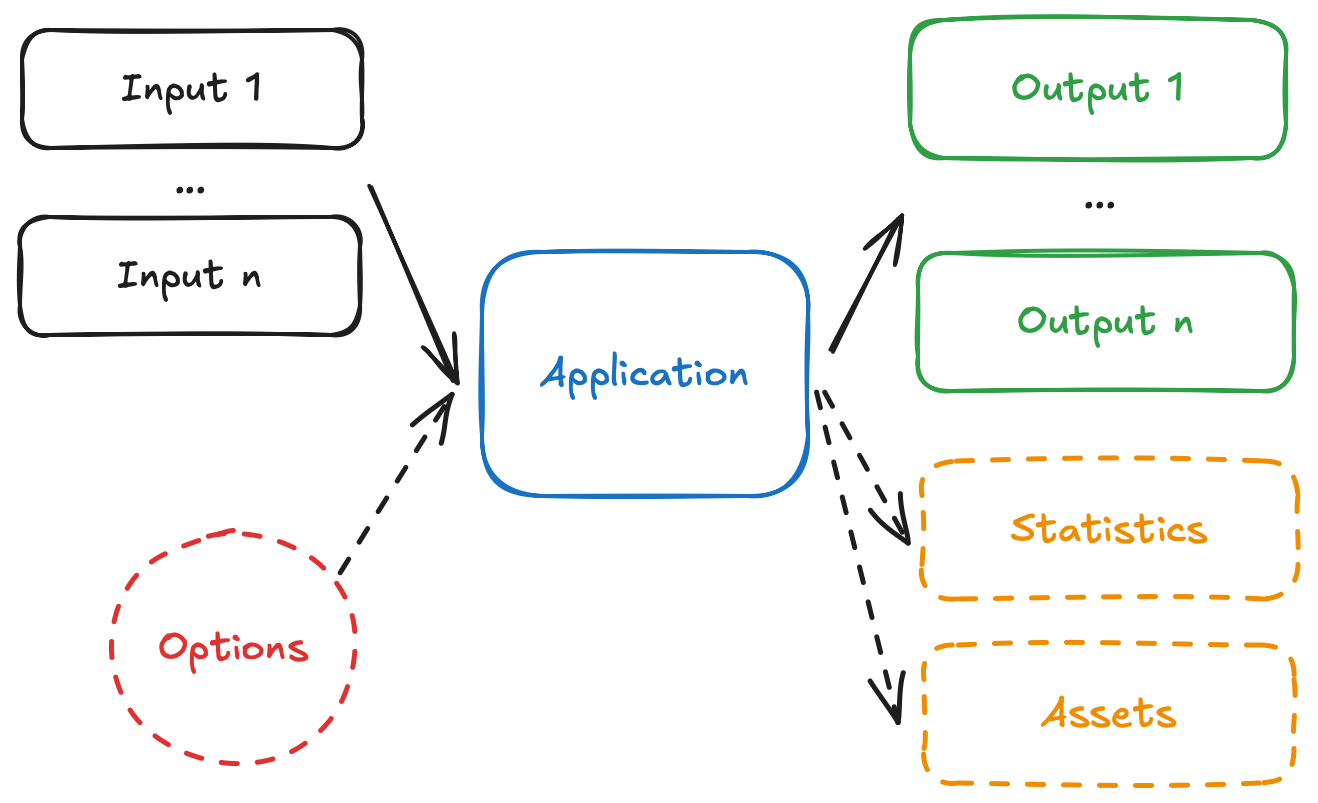
App diagram

  • The app receives one, or more, inputs (problem data), through stdin or files.
  • The app run can be configured through options, that are received as CLI arguments.
  • The app processes the inputs, and executes the decision model.
  • The app produces one, or more, outputs (solutions), and prints to stdout or files.
  • The app optionally produces statistics (metrics) and assets (can be visual, like charts).

We are going to adapt the examples so that they can follow these conventions.

Start by adding the app.yaml file, which is known as the app manifest, to the root of the project. This file contains the configuration of the app.

type: go
runtime: ghcr.io/nextmv-io/runtime/default:latest
files:
  - main
  - HiGHS/build/lib/
  - nlohmann/json.hpp
build:
  command: bash ./build.sh
execution:
  entrypoint: main
configuration:
  content:
    format: json
  options:
    items:
      - name: duration
        description: Duration for the solver, in seconds.
        required: false
        option_type: float
        default: 1
        additional_attributes:
          min: 0
          max: 10
          step: 1
        ui:
          control_type: slider
Copy

This tutorial is not meant to discuss the app manifest in-depth, for that you can go to the manifest docs. However, these are the main attributes shown in the manifests:

  • type: both are different types of applications.
  • runtime: HiGHS uses the default runtime to execute binaries, while OR-Tools uses the java runtime to execute Java applications.
  • build.command: specifies in both cases the command to build the executable code. We are going to compile an artifact for both examples.
  • execution.entrypoint: specifies in both cases the executable code to run.
  • files: contains files that make up the executable code of the app. For HiGHS, we are including the main binary and the required libraries. For OR-Tools, we are including the main.jar file.
  • configuration.content: HiGHS will use the json format, so it does not need additional configurations. OR-Tools will use multi-file, so additional configurations are needed. As you complete this tutorial, the difference between the two formats will become clearer.
  • configuration.options: for both examples, we are adding options to the application, which allow you to configure runs, with parameters such as solver duration.

Now, you can overwrite your decision model files with the Nextmv-ified version.

// HiGHS is designed to solve linear optimization problems of the form
//
// Min (1/2)x^TQx + c^Tx + d subject to L <= Ax <= U; l <= x <= u
//
// where A is a matrix with m rows and n columns, and Q is either zero
// or positive definite. If Q is zero, HiGHS can determine the optimal
// integer-valued solution.
//
// The scalar n is num_col_
// The scalar m is num_row_
//
// The vector c is col_cost_
// The scalar d is offset_
// The vector l is col_lower_
// The vector u is col_upper_
// The vector L is row_lower_
// The vector U is row_upper_
//
// The matrix A is represented in packed vector form, either
// row-wise or column-wise: only its nonzeros are stored
//
// * The number of nonzeros in A is num_nz
//
// * The indices of the nonnzeros in the vectors of A are stored in a_index
//
// * The values of the nonnzeros in the vectors of A are stored in a_value
//
// * The position in a_index/a_value of the index/value of the first
// nonzero in each vector is stored in a_start
//
// Note that a_start[0] must be zero
//
// The matrix Q is represented in packed column form
//
// * The dimension of Q is dim_
//
// * The number of nonzeros in Q is hessian_num_nz
//
// * The indices of the nonnzeros in the vectors of A are stored in q_index
//
// * The values of the nonnzeros in the vectors of A are stored in q_value
//
// * The position in q_index/q_value of the index/value of the first
// nonzero in each column is stored in q_start
//
// Note
//
// * By default, Q is zero. This is indicated by dim_ being initialised to zero.
//
// * q_start[0] must be zero
//
#include <cassert>
#include <chrono>
#include <fstream>
#include <iostream>
#include <string>

#include "Highs.h"
#include "nlohmann/json.hpp"

#include <sstream>
#include <vector>

using std::cout;
using std::endl;
using json = nlohmann::json;

int main(int argc, char* argv[]) {
  // Start timing
  auto start_time = std::chrono::high_resolution_clock::now();
  
  // Parse command line arguments for time_limit
  double time_limit = 0.0;  // 0 means no limit
  for (int i = 1; i < argc; i++) {
    std::string arg = argv[i];
    if (arg.find("--time_limit=") == 0) {
      time_limit = std::stod(arg.substr(13));
    } else if (arg == "--time_limit" && i + 1 < argc) {
      time_limit = std::stod(argv[++i]);
    }
  }
  
  // Read and parse JSON from stdin
  json j;
  try {
    std::cin >> j;
  } catch (const json::parse_error& e) {
    std::cerr << "Error: Failed to parse JSON input: " << e.what() << std::endl;
    return 1;
  }
  
  if (j.empty()) {
    std::cerr << "Error: No input provided on stdin" << std::endl;
    return 1;
  }
  
  // Parse the JSON and create the model
  HighsModel model;
  model.lp_.num_col_ = j["num_col"].get<int>();
  model.lp_.num_row_ = j["num_row"].get<int>();
  model.lp_.sense_ = ObjSense::kMinimize;
  model.lp_.offset_ = j.value("offset", 0.0);
  model.lp_.col_cost_ = j["col_cost"].get<std::vector<double>>();
  model.lp_.col_lower_ = j["col_lower"].get<std::vector<double>>();
  model.lp_.col_upper_ = j["col_upper"].get<std::vector<double>>();
  model.lp_.row_lower_ = j["row_lower"].get<std::vector<double>>();
  model.lp_.row_upper_ = j["row_upper"].get<std::vector<double>>();
  
  // Parse the a_matrix object
  const auto& matrix = j["a_matrix"];
  
  // Set matrix format from JSON
  std::string format = matrix["format"].get<std::string>();
  if (format == "rowwise") {
    model.lp_.a_matrix_.format_ = MatrixFormat::kRowwise;
  } else {
    model.lp_.a_matrix_.format_ = MatrixFormat::kColwise;
  }
  model.lp_.a_matrix_.start_ = matrix["start"].get<std::vector<int>>();
  model.lp_.a_matrix_.index_ = matrix["index"].get<std::vector<int>>();
  model.lp_.a_matrix_.value_ = matrix["value"].get<std::vector<double>>();
  //
  // Create a Highs instance
  Highs highs;
  HighsStatus return_status;
  
  // Suppress HiGHS output
  highs.setOptionValue("output_flag", false);
  highs.setOptionValue("log_to_console", false);
  
  // Set time limit if provided
  if (time_limit > 0.0) {
    highs.setOptionValue("time_limit", time_limit);
    std::cerr << "Time limit set to " << time_limit << " seconds" << endl;
  }
  //
  // Pass the model to HiGHS
  return_status = highs.passModel(model);
  assert(return_status == HighsStatus::kOk);
  // If a user passes a model with entries in
  // model.lp_.a_matrix_.value_ less than (the option)
  // small_matrix_value in magnitude, they will be ignored. A logging
  // message will indicate this, and passModel will return
  // HighsStatus::kWarning
  //
  // Get a const reference to the LP data in HiGHS
  const HighsLp& lp = highs.getLp();
  //
  // Solve the model
  return_status = highs.run();
  assert(return_status == HighsStatus::kOk);
  //
  // Get the model status
  const HighsModelStatus& model_status = highs.getModelStatus();
  assert(model_status == HighsModelStatus::kOptimal);
  std::cerr << "Model status: " << highs.modelStatusToString(model_status) << endl;
  //
  // Get the solution information
  const HighsInfo& info = highs.getInfo();
  std::cerr << "Simplex iteration count: " << info.simplex_iteration_count << endl;
  std::cerr << "Objective function value: " << info.objective_function_value << endl;
  std::cerr << "Primal  solution status: "
       << highs.solutionStatusToString(info.primal_solution_status) << endl;
  std::cerr << "Dual    solution status: "
       << highs.solutionStatusToString(info.dual_solution_status) << endl;
  std::cerr << "Basis: " << highs.basisValidityToString(info.basis_validity) << endl;
  const bool has_values = info.primal_solution_status;
  const bool has_duals = info.dual_solution_status;
  const bool has_basis = info.basis_validity;
  //
  // Get the solution values and basis
  const HighsSolution& solution = highs.getSolution();
  const HighsBasis& basis = highs.getBasis();
  //
  // Report the primal and solution values and basis to stderr
  for (int col = 0; col < lp.num_col_; col++) {
    std::cerr << "Column " << col;
    if (has_values) std::cerr << "; value = " << solution.col_value[col];
    if (has_duals) std::cerr << "; dual = " << solution.col_dual[col];
    if (has_basis)
      std::cerr << "; status: " << highs.basisStatusToString(basis.col_status[col]);
    std::cerr << endl;
  }
  for (int row = 0; row < lp.num_row_; row++) {
    std::cerr << "Row    " << row;
    if (has_values) std::cerr << "; value = " << solution.row_value[row];
    if (has_duals) std::cerr << "; dual = " << solution.row_dual[row];
    if (has_basis)
      std::cerr << "; status: " << highs.basisStatusToString(basis.row_status[row]);
    std::cerr << endl;
  }

  // Now indicate that all the variables must take integer values from JSON
  if (j.contains("integrality")) {
    std::vector<int> integrality = j["integrality"].get<std::vector<int>>();
    if (!integrality.empty()) {
      model.lp_.integrality_.resize(lp.num_col_);
      for (int col = 0; col < lp.num_col_; col++)
        model.lp_.integrality_[col] = integrality[col] == 1 ? HighsVarType::kInteger : HighsVarType::kContinuous;
    }
  }

  highs.passModel(model);
  // Solve the model
  return_status = highs.run();
  assert(return_status == HighsStatus::kOk);
  
  // Calculate duration
  auto end_time = std::chrono::high_resolution_clock::now();
  std::chrono::duration<double> duration = end_time - start_time;
  
  // Build output JSON
  json output;
  
  // Add solution columns
  json columns = json::array();
  for (int col = 0; col < lp.num_col_; col++) {
    json column_obj;
    column_obj["index"] = col;
    if (info.primal_solution_status) {
      column_obj["value"] = solution.col_value[col];
    }
    columns.push_back(column_obj);
  }
  
  // Add solution rows
  json rows = json::array();
  for (int row = 0; row < lp.num_row_; row++) {
    json row_obj;
    row_obj["index"] = row;
    if (info.primal_solution_status) {
      row_obj["value"] = solution.row_value[row];
    }
    rows.push_back(row_obj);
  }
  
  // Build complete output structure
  output["solution"]["columns"] = columns;
  output["solution"]["rows"] = rows;
  output["statistics"]["schema"] = "v1";
  output["statistics"]["result"]["value"] = info.objective_function_value;
  output["statistics"]["result"]["duration"] = duration.count();
  output["statistics"]["result"]["custom"]["simplex_iteration_count"] = info.simplex_iteration_count;
  output["statistics"]["result"]["custom"]["status"] = highs.modelStatusToString(model_status);
  
  // Output formatted JSON to stdout
  cout << output.dump(2) << endl;

  highs.resetGlobalScheduler(true);

  return 0;
}
Copy

This is a short summary of the changes introduced for each of the examples:

  • HiGHS
    • Added parsing of command line arguments to extract options.
    • Added reading of input data from stdin, in json format.
    • Modified the model definition to use the loaded input data.
    • Store the solution to the problem, and solver metrics (statistics), in an output.
    • Write the output to stdout, given that we are working with the json content format.
  • OR-Tools
    • Added parsing of command line arguments to extract options.
    • The input data is no longer in the Java file itself. We are representing the problem with several files under the inputs directory. In inputs/distance.json we are going to write the distance matrix. In inputs/pickups_deliveries.json we are going to set the information about the precedence of stops, defining pickup-delivery pairs. In inputs/problem.json we are storing additional information about the problem. When working with more than one file, the multi-file content format is ideal.
    • Modified the model definition to use the loaded input data.
    • Write the output to several files, under the outputs directory, given that we are working with the multi-file content format.

Here are the data files that you need to place in an inputs directory.

  • HiGHS

    {
      "num_col": 2,
      "num_row": 3,
      "offset": 3,
      "col_cost": [1.0, 1.0],
      "col_lower": [0.0, 1.0],
      "col_upper": [4.0, 1.0e30],
      "row_lower": [-1.0e30, 5.0, 6.0],
      "row_upper": [7.0, 15.0, 1.0e30],
      "a_matrix": {
        "format": "colwise",
        "start": [0, 2, 5],
        "index": [1, 2, 0, 1, 2],
        "value": [1.0, 3.0, 1.0, 2.0, 2.0]
      },
      "integrality": [1, 1]
    }
    
    Copy
  • OR-Tools

    [
      [
        0, 548, 776, 696, 582, 274, 502, 194, 308, 194, 536, 502, 388, 354, 468,
        776, 662
      ],
      [
        548, 0, 684, 308, 194, 502, 730, 354, 696, 742, 1084, 594, 480, 674, 1016,
        868, 1210
      ],
      [
        776, 684, 0, 992, 878, 502, 274, 810, 468, 742, 400, 1278, 1164, 1130, 788,
        1552, 754
      ],
      [
        696, 308, 992, 0, 114, 650, 878, 502, 844, 890, 1232, 514, 628, 822, 1164,
        560, 1358
      ],
      [
        582, 194, 878, 114, 0, 536, 764, 388, 730, 776, 1118, 400, 514, 708, 1050,
        674, 1244
      ],
      [
        274, 502, 502, 650, 536, 0, 228, 308, 194, 240, 582, 776, 662, 628, 514,
        1050, 708
      ],
      [
        502, 730, 274, 878, 764, 228, 0, 536, 194, 468, 354, 1004, 890, 856, 514,
        1278, 480
      ],
      [
        194, 354, 810, 502, 388, 308, 536, 0, 342, 388, 730, 468, 354, 320, 662,
        742, 856
      ],
      [
        308, 696, 468, 844, 730, 194, 194, 342, 0, 274, 388, 810, 696, 662, 320,
        1084, 514
      ],
      [
        194, 742, 742, 890, 776, 240, 468, 388, 274, 0, 342, 536, 422, 388, 274,
        810, 468
      ],
      [
        536, 1084, 400, 1232, 1118, 582, 354, 730, 388, 342, 0, 878, 764, 730, 388,
        1152, 354
      ],
      [
        502, 594, 1278, 514, 400, 776, 1004, 468, 810, 536, 878, 0, 114, 308, 650,
        274, 844
      ],
      [
        388, 480, 1164, 628, 514, 662, 890, 354, 696, 422, 764, 114, 0, 194, 536,
        388, 730
      ],
      [
        354, 674, 1130, 822, 708, 628, 856, 320, 662, 388, 730, 308, 194, 0, 342,
        422, 536
      ],
      [
        468, 1016, 788, 1164, 1050, 514, 514, 662, 320, 274, 388, 650, 536, 342, 0,
        764, 194
      ],
      [
        776, 868, 1552, 560, 674, 1050, 1278, 742, 1084, 810, 1152, 274, 388, 422,
        764, 0, 798
      ],
      [
        662, 1210, 754, 1358, 1244, 708, 480, 856, 514, 468, 354, 844, 730, 536,
        194, 798, 0
      ]
    ]
    
    Copy

Aside from the app.yaml manifest file, the code changes, and the introduction of the inputs directory, we need to make some more minor adjustments.

4.1. HiGHS

  • Given we introduced the nlohmann/json library for JSON parsing and writing, we need to get the library.

    mkdir -p nlohmann
    curl -L https://github.com/nlohmann/json/releases/download/v3.11.3/json.hpp \
      -o nlohmann/json.hpp
    
    Copy
  • When we push the Nextmv application to Cloud, we need to cross-compile for Linux ARM64. To do this, we can use Docker. Add the following Dockerfile to the root of your Nextmv application.

    FROM ubuntu:22.04
    
    # Install build dependencies.
    RUN apt-get update && apt-get install -y \
        build-essential \
        cmake \
        git \
        curl \
        && rm -rf /var/lib/apt/lists/*
    
    # Set working directory.
    WORKDIR /app
    
    # Build HiGHS.
    RUN git clone https://github.com/ERGO-Code/HiGHS.git
    WORKDIR /app/HiGHS
    RUN cmake -S. -B build 
    RUN cmake --build build --parallel
    
    # Download nlohmann/json header.
    WORKDIR /app
    RUN mkdir -p nlohmann
    RUN curl -L https://github.com/nlohmann/json/releases/download/v3.11.3/json.hpp \
            -o nlohmann/json.hpp
    
    # Copy source code.
    COPY main.cpp /app/
    
    # Compile the application.
    RUN g++ -std=c++11 main.cpp -o main \
            -I. \
            -I./HiGHS/highs \
            -I./HiGHS/build \
            -L./HiGHS/build/lib -lhighs
    
    Copy
  • In the app.yaml manifest, we specified a build.sh script that will run before pushing the app. This script will cross-compile the necessary dependencies and the binary so that it is ready to run in the Nextmv Platform.

    #!/bin/bash
    
    set -euo pipefail
    
    # Build the Docker image
    docker buildx build -f Dockerfile -t highs-solver --platform linux/arm64 --load .
    
    # Extract the compiled binary from the container
    docker run --name highs-solver --platform linux/arm64 highs-solver
    docker cp highs-solver:/app/main ./main
    echo "🐰 Binary extracted to ./main"
    mkdir -p HiGHS/build
    docker cp highs-solver:/app/HiGHS/build/lib ./HiGHS/build
    echo "🐰 Required libraries extracted to ./HiGHS/build/lib"
    docker cp highs-solver:/app/nlohmann ./nlohmann 
    echo "🐰 nlohmann/json header extracted to ./nlohmann"
    docker rm highs-solver
    echo "🐰 Build completed successfully."
    
    Copy

After you are done Nextmv-ifying, your Nextmv app should have the following structure for this example.

.
β”œβ”€β”€ app.yaml
β”œβ”€β”€ build.sh
β”œβ”€β”€ Dockerfile
β”œβ”€β”€ HiGHS
β”‚   β”œβ”€β”€ ... More stuff
β”‚Β Β  └── build
β”‚Β Β   Β Β  └── lib
β”‚Β Β   Β Β   Β Β  β”œβ”€β”€ libhighs.1.12.dylib
β”‚Β Β   Β Β   Β Β  β”œβ”€β”€ libhighs.1.dylib -> libhighs.1.12.dylib
β”‚Β Β   Β Β   Β Β  β”œβ”€β”€ libhighs.dylib -> libhighs.1.dylib
β”‚Β Β   Β Β   Β Β  β”œβ”€β”€ libhighs.so -> libhighs.so.1
β”‚Β Β   Β Β   Β Β  β”œβ”€β”€ libhighs.so.1 -> libhighs.so.1.12.0
β”‚Β Β   Β Β   Β Β  └── libhighs.so.1.12.0
β”œβ”€β”€ inputs
β”‚Β Β  └── problem.json
β”œβ”€β”€ main.cpp
β”œβ”€β”€ nlohmann
β”‚Β Β  └── json.hpp
└── README.md
Copy

Now you are ready to explore the Nextmv Platform πŸ₯³.

4.2. OR-Tools

  • Modify the pom.xml file to include the new dependencies.

    <?xml version="1.0" encoding="UTF-8"?>
    <project xmlns="http://maven.apache.org/POM/4.0.0"
        xmlns:xsi="http://www.w3.org/2001/XMLSchema-instance"
        xsi:schemaLocation="http://maven.apache.org/POM/4.0.0 http://maven.apache.org/xsd/maven-4.0.0.xsd">
        <modelVersion>4.0.0</modelVersion>
    
        <groupId>com.google.ortools</groupId>
        <artifactId>vrp-pickup-delivery</artifactId>
        <version>1.0-SNAPSHOT</version>
        <packaging>jar</packaging>
    
        <name>VRP Pickup Delivery</name>
        <description>Vehicle Routing Problem with Pickup and Delivery using OR-Tools</description>
    
        <properties>
            <project.build.sourceEncoding>UTF-8</project.build.sourceEncoding>
            <maven.compiler.source>11</maven.compiler.source>
            <maven.compiler.target>11</maven.compiler.target>
            <ortools.version>9.8.3296</ortools.version>
        </properties>
    
        <dependencies>
            
            <dependency>
                <groupId>com.google.ortools</groupId>
                <artifactId>ortools-java</artifactId>
                <version>${ortools.version}</version>
            </dependency>
    
            
            <dependency>
                <groupId>com.google.code.gson</groupId>
                <artifactId>gson</artifactId>
                <version>2.10.1</version>
            </dependency>
        </dependencies>
    
        <build>
            <plugins>
                
                <plugin>
                    <groupId>org.apache.maven.plugins</groupId>
                    <artifactId>maven-compiler-plugin</artifactId>
                    <version>3.11.0</version>
                    <configuration>
                        <source>11</source>
                        <target>11</target>
                    </configuration>
                </plugin>
    
                
                <plugin>
                    <groupId>org.codehaus.mojo</groupId>
                    <artifactId>exec-maven-plugin</artifactId>
                    <version>3.1.0</version>
                    <configuration>
                        <mainClass>com.google.ortools.constraintsolver.samples.VrpPickupDelivery</mainClass>
                    </configuration>
                    <executions>
                        <execution>
                            <id>remove-original-jar</id>
                            <phase>package</phase>
                            <goals>
                                <goal>exec</goal>
                            </goals>
                            <configuration>
                                <executable>rm</executable>
                                <arguments>
                                    <argument>-f</argument>
                                    <argument>original-main.jar</argument>
                                </arguments>
                            </configuration>
                        </execution>
                    </executions>
                </plugin>
    
                
                <plugin>
                    <groupId>org.apache.maven.plugins</groupId>
                    <artifactId>maven-shade-plugin</artifactId>
                    <version>3.5.1</version>
                    <executions>
                        <execution>
                            <phase>package</phase>
                            <goals>
                                <goal>shade</goal>
                            </goals>
                            <configuration>
                                <createDependencyReducedPom>false</createDependencyReducedPom>
                                <shadedArtifactAttached>false</shadedArtifactAttached>
                                <outputDirectory>.</outputDirectory>
                                <finalName>main</finalName>
                                <shadedClassifierName>shaded</shadedClassifierName>
                                <keepDependenciesWithProvidedScope>false</keepDependenciesWithProvidedScope>
                                <createSourcesJar>false</createSourcesJar>
                                <transformers>
                                    <transformer
                                        implementation="org.apache.maven.plugins.shade.resource.ManifestResourceTransformer">
                                        <mainClass>
                                            com.google.ortools.constraintsolver.samples.VrpPickupDelivery</mainClass>
                                    </transformer>
                                </transformers>
                                <filters>
                                    <filter>
                                        <artifact>*:*</artifact>
                                        <excludes>
                                            <exclude>META-INF/*.SF</exclude>
                                            <exclude>META-INF/*.DSA</exclude>
                                            <exclude>META-INF/*.RSA</exclude>
                                        </excludes>
                                    </filter>
                                </filters>
                            </configuration>
                        </execution>
                    </executions>
                </plugin>
            </plugins>
        </build>
    </project>
    
    Copy

After you are done Nextmv-ifying, your Nextmv app should have the following structure for this example.

.
β”œβ”€β”€ app.yaml
β”œβ”€β”€ inputs
β”‚Β Β  β”œβ”€β”€ distance.json
β”‚Β Β  β”œβ”€β”€ pickups_deliveries.json
β”‚Β Β  └── problem.json
β”œβ”€β”€ main.jar
β”œβ”€β”€ pom.xml
β”œβ”€β”€ README.md
└── src
    └── main
        └── java
            └── com
                └── google
                    └── ortools
                        └── constraintsolver
                            └── samples
                                └── VrpPickupDelivery.java
Copy

Now you are ready to explore the Nextmv Platform πŸ₯³.

5. Re-compile and run the executable code

Given that we made some modifications to the examples to Nextmv-ify them, we need to re-compile and run again to make sure they work.

5.1. HiGHS

  • Compile the example, using the following command. Note that this command is different from the one already shown before.

    g++ -std=c++11 main.cpp -o main \
      -I. \
      -I./HiGHS/highs \
      -I./HiGHS/build \
      -L./HiGHS/build/lib -lhighs
    
    Copy
  • A ./main executable file should have been created.

  • Run the example, reading the problem definition from stdin, and writing the output to stdout.

    cat inputs/problem.json | DYLD_LIBRARY_PATH=./HiGHS/build/lib ./main
    
    Copy

Here is the updated output produced by this example.

Model status: Optimal
Simplex iteration count: 2
Objective function value: 5.75
Primal  solution status: Feasible
Dual    solution status: Feasible
Basis: Valid
Column 0; value = 0.5; dual = 0; status: Basic
Column 1; value = 2.25; dual = 0; status: Basic
Row    0; value = 2.25; dual = -0; status: Basic
Row    1; value = 5; dual = 0.25; status: At lower/fixed bound
Row    2; value = 6; dual = 0.25; status: At lower/fixed bound
{
  "solution": {
    "columns": [
      {
        "index": 0,
        "value": -0.0
      },
      {
        "index": 1,
        "value": 3.0
      }
    ],
    "rows": [
      {
        "index": 0,
        "value": 3.0
      },
      {
        "index": 1,
        "value": 6.0
      },
      {
        "index": 2,
        "value": 6.0
      }
    ]
  },
  "statistics": {
    "result": {
      "custom": {
        "simplex_iteration_count": 0,
        "status": "Optimal"
      },
      "duration": 0.012559167,
      "value": 6.0
    },
    "schema": "v1"
  }
}
Copy

5.2. OR-Tools

  • The commands for compiling and running stay the same.

  • Execute the following command to compile the code.

    mvn clean package
    
    Copy
  • A ./main.jar file should have been created.

  • Execute the following command to run the code.

    java -jar main.jar
    
    Copy

Here is the updated output produced by this example.

Dec 01, 2025 4:36:04 PM com.google.ortools.constraintsolver.samples.VrpPickupDelivery printSolution
INFO: Objective : 226116
Dec 01, 2025 4:36:04 PM com.google.ortools.constraintsolver.samples.VrpPickupDelivery printSolution
INFO: Route for Vehicle 0:
Dec 01, 2025 4:36:04 PM com.google.ortools.constraintsolver.samples.VrpPickupDelivery printSolution
INFO: 0 -> 13 -> 15 -> 11 -> 12 -> 0
Dec 01, 2025 4:36:04 PM com.google.ortools.constraintsolver.samples.VrpPickupDelivery printSolution
INFO: Distance of the route: 1552m
Dec 01, 2025 4:36:04 PM com.google.ortools.constraintsolver.samples.VrpPickupDelivery printSolution
INFO: Route for Vehicle 1:
Dec 01, 2025 4:36:04 PM com.google.ortools.constraintsolver.samples.VrpPickupDelivery printSolution
INFO: 0 -> 5 -> 2 -> 10 -> 16 -> 14 -> 9 -> 0
Dec 01, 2025 4:36:04 PM com.google.ortools.constraintsolver.samples.VrpPickupDelivery printSolution
INFO: Distance of the route: 2192m
Dec 01, 2025 4:36:04 PM com.google.ortools.constraintsolver.samples.VrpPickupDelivery printSolution
INFO: Route for Vehicle 2:
Dec 01, 2025 4:36:04 PM com.google.ortools.constraintsolver.samples.VrpPickupDelivery printSolution
INFO: 0 -> 4 -> 3 -> 0
Dec 01, 2025 4:36:04 PM com.google.ortools.constraintsolver.samples.VrpPickupDelivery printSolution
INFO: Distance of the route: 1392m
Dec 01, 2025 4:36:04 PM com.google.ortools.constraintsolver.samples.VrpPickupDelivery printSolution
INFO: Route for Vehicle 3:
Dec 01, 2025 4:36:04 PM com.google.ortools.constraintsolver.samples.VrpPickupDelivery printSolution
INFO: 0 -> 7 -> 1 -> 6 -> 8 -> 0
Dec 01, 2025 4:36:04 PM com.google.ortools.constraintsolver.samples.VrpPickupDelivery printSolution
INFO: Distance of the route: 1780m
Dec 01, 2025 4:36:04 PM com.google.ortools.constraintsolver.samples.VrpPickupDelivery printSolution
INFO: Total Distance of all routes: 6916m
Dec 01, 2025 4:36:04 PM com.google.ortools.constraintsolver.samples.VrpPickupDelivery saveSolutionToFile
INFO: Solution saved to outputs/solutions/solution.json
Dec 01, 2025 4:36:04 PM com.google.ortools.constraintsolver.samples.VrpPickupDelivery saveStatisticsToFile
INFO: Statistics saved to outputs/statistics/statistics.json
Copy

6. Create an account

The full suite of benefits starts with a Nextmv Cloud account.

  1. Visit the Nextmv Console to sign up for an account at https://cloud.nextmv.io.
  2. Verify your account.
    • You’ll receive an email asking to verify your account.
    • Follow the link in that email to sign in.
  3. Log in to your account. The Nextmv Console is ready to use!

Once you have logged in to your account, you need to fetch your API key. You can do so from your settings.

API keys

When you have your API key, it is convenient to save it as an environment variable so that you can use it for the rest of this tutorial.

export NEXTMV_API_KEY="<YOUR-API-KEY>"
Copy

7. Subscribe to a Nextmv Plan

If you already have an active Nextmv Plan, you can skip this step.

If a Nextmv member provides different instructions for activating a Nextmv Plan, please follow those instructions instead.

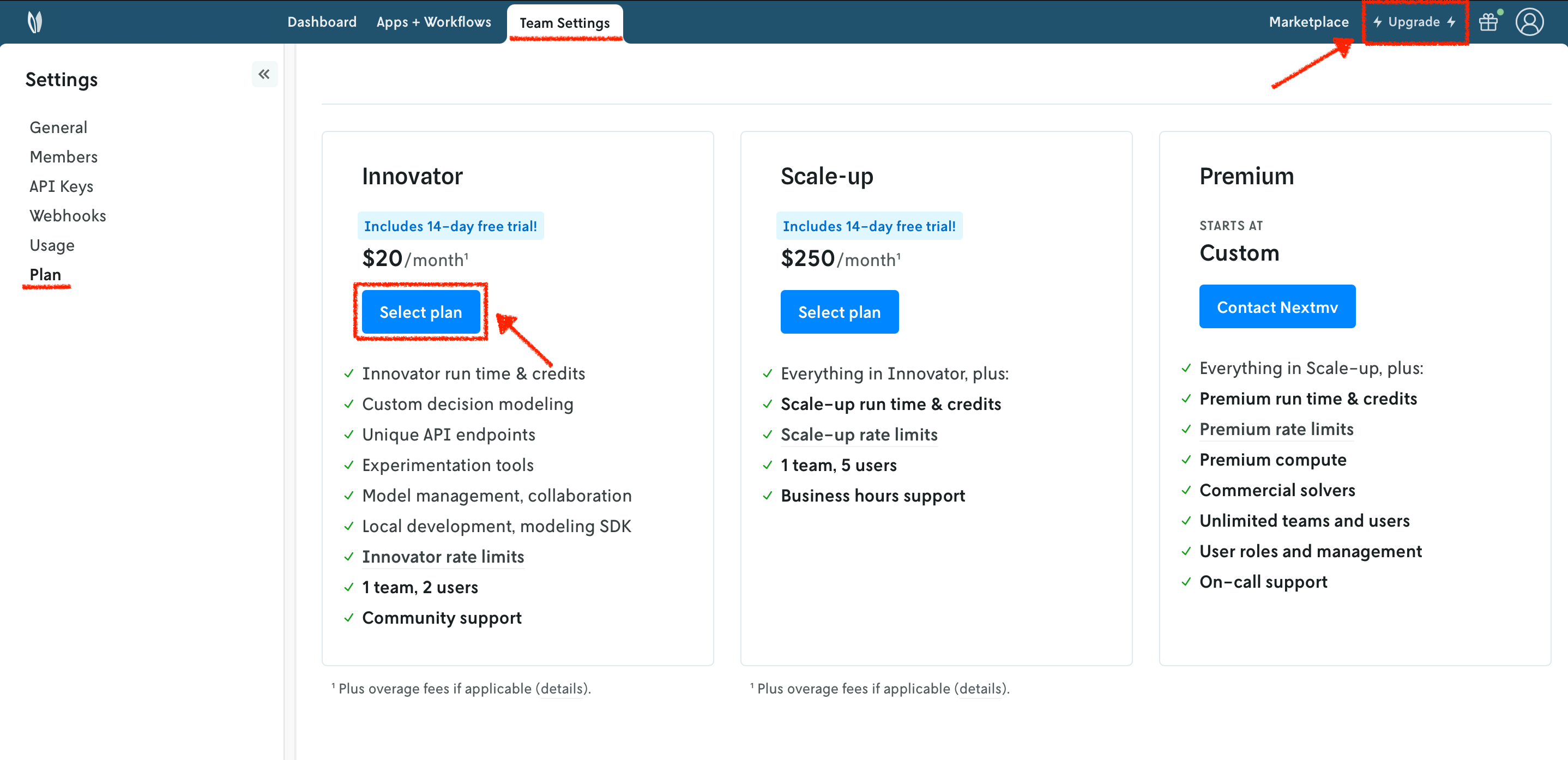
Running a custom application remotely in Nextmv Cloud requires a paid plan. However, plans come with a 14-day free trial that can be canceled at any time. You can upgrade your account and subscribe to a plan in Nextmv Console by clicking the Upgrade button in the header, or navigating to the Settings-> Plan section. Upgrading to a plan will allow you to complete the rest of the tutorial.
Plans

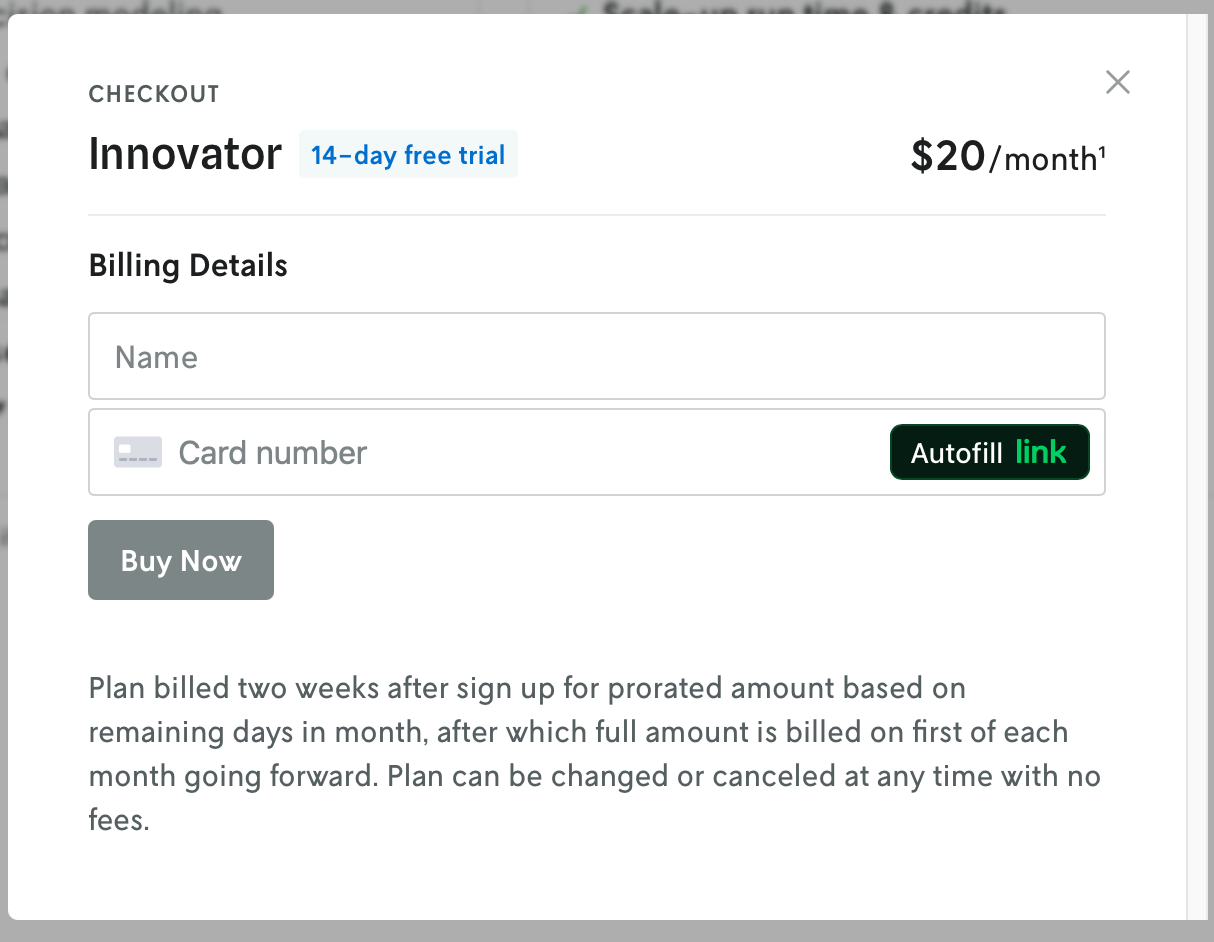
In the example shown below, you will be subscribing to an Innovator plan. A pop-up window will appear, and you will need to fill in your payment details.
Innovator

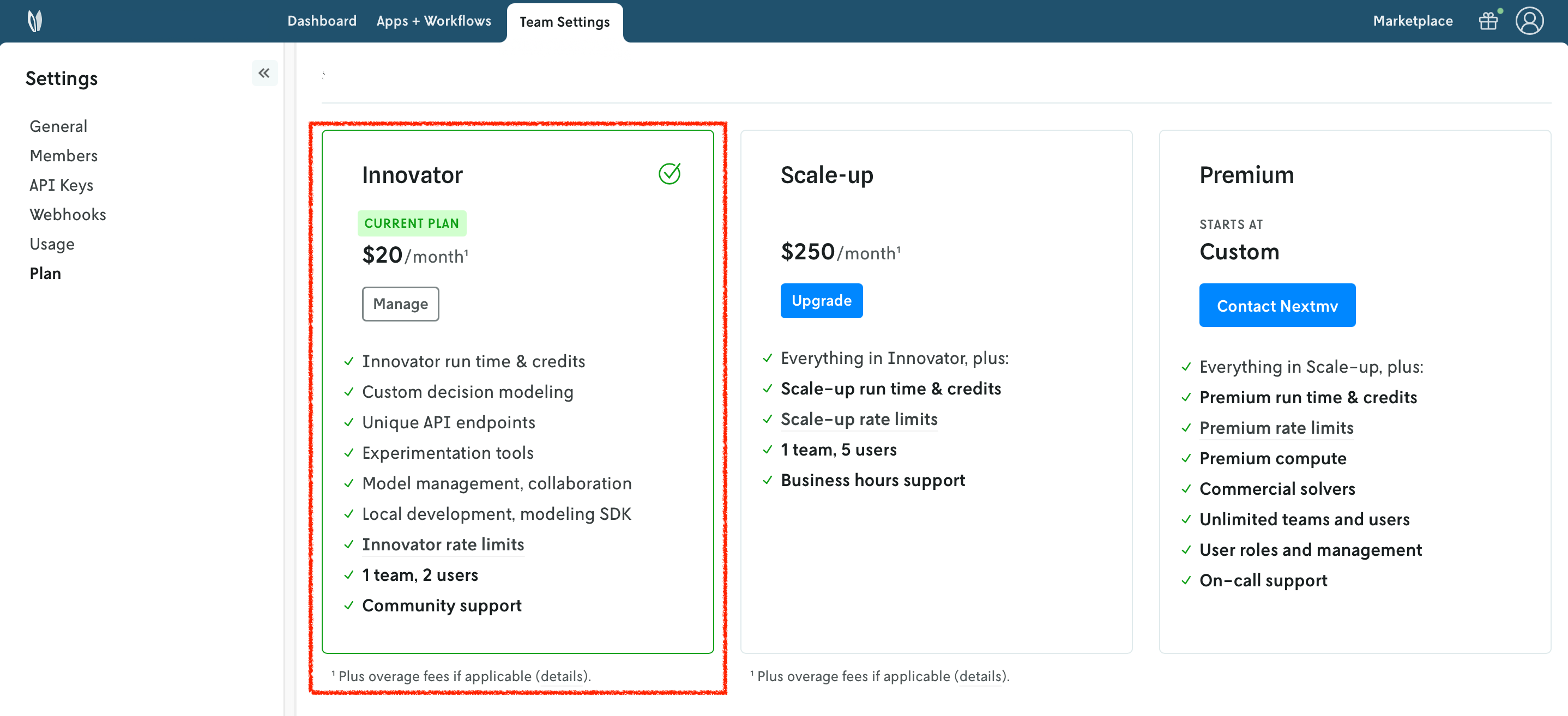
Once your account has been upgraded, you will see an active plan in your account.
Active plan

8. Install the Nextmv CLI

Run the following script to install Nextmv CLI:

export NEXTMV_BASE_URL=https://api.cloud.nextmv.io
curl -sS "https://cloud.nextmv.io/install-cli.txt" | bash -
Copy

After downloading and installing, the last step is to configure Nextmv CLI with your account:

nextmv configure --api-key $NEXTMV_API_KEY
Copy

To check if the installation was successful, run the following command to show the help menu:

nextmv --help
Copy

9. Create your Nextmv Cloud Application

At the root of your local project (where the app.yaml manifest is located), run the following command:

$ nextmv app create -n test-highs -a test-highs

{
  "id": "test-highs",
  "name": "test-highs",
  "description": "",
  "type": "custom",
  "default_instance": ""
}
Copy

This will create a new application in Nextmv Cloud. Note that the name and app ID can be different, but for simplicity this tutorial uses the same name and app ID. This command is saved as app1.sh in the full tutorial code. You can also create applications directly from Nextmv Console.

You can go to the Apps section in the Nextmv Console where you will see your applications.
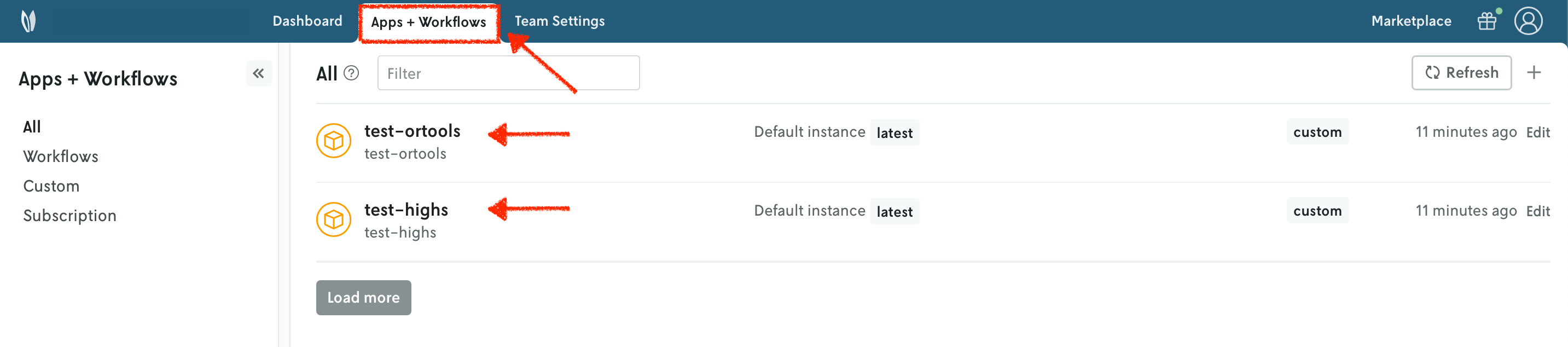
Apps

10. Push your Nextmv Application

So far, your application has run locally. You are going to push your app to Nextmv Cloud. Once an application has been pushed, you can run it remotely, perform testing, experimentation, and much more. Pushing is the equivalent of deploying an application, this is, taking the executable code and sending it to Nextmv Cloud.

Deploy your app (push it) to Nextmv Cloud:

$ nextmv app push -a test-highs

πŸ’½ Starting build for Nextmv application.
🚧 Running build command: "/opt/homebrew/bin/bash ./build.sh".
... Build output trimmed for brevity ...
πŸ“‹ Copied files listed in "app.yaml" manifest.
πŸ“¦ Packaged application (11.23 MiB, 9 files).
🌟 Pushing to application: "test-highs".
πŸ’₯️ Successfully pushed to application: "test-highs".
{
  "app_id": "test-highs",
  "endpoint": "api.cloud.nextmv.io",
  "instance_url": "https://api.cloud.nextmv.io/v1/applications/test-highs/runs?instance_id=devint"
}
Copy

This command is saved as app2.sh in the full tutorial code.

You can go to the Apps section in the Nextmv Console where you will see your application. You can click on it to see more details. Once you are in the overview of the application in the Nextmv Console, it should show the following:
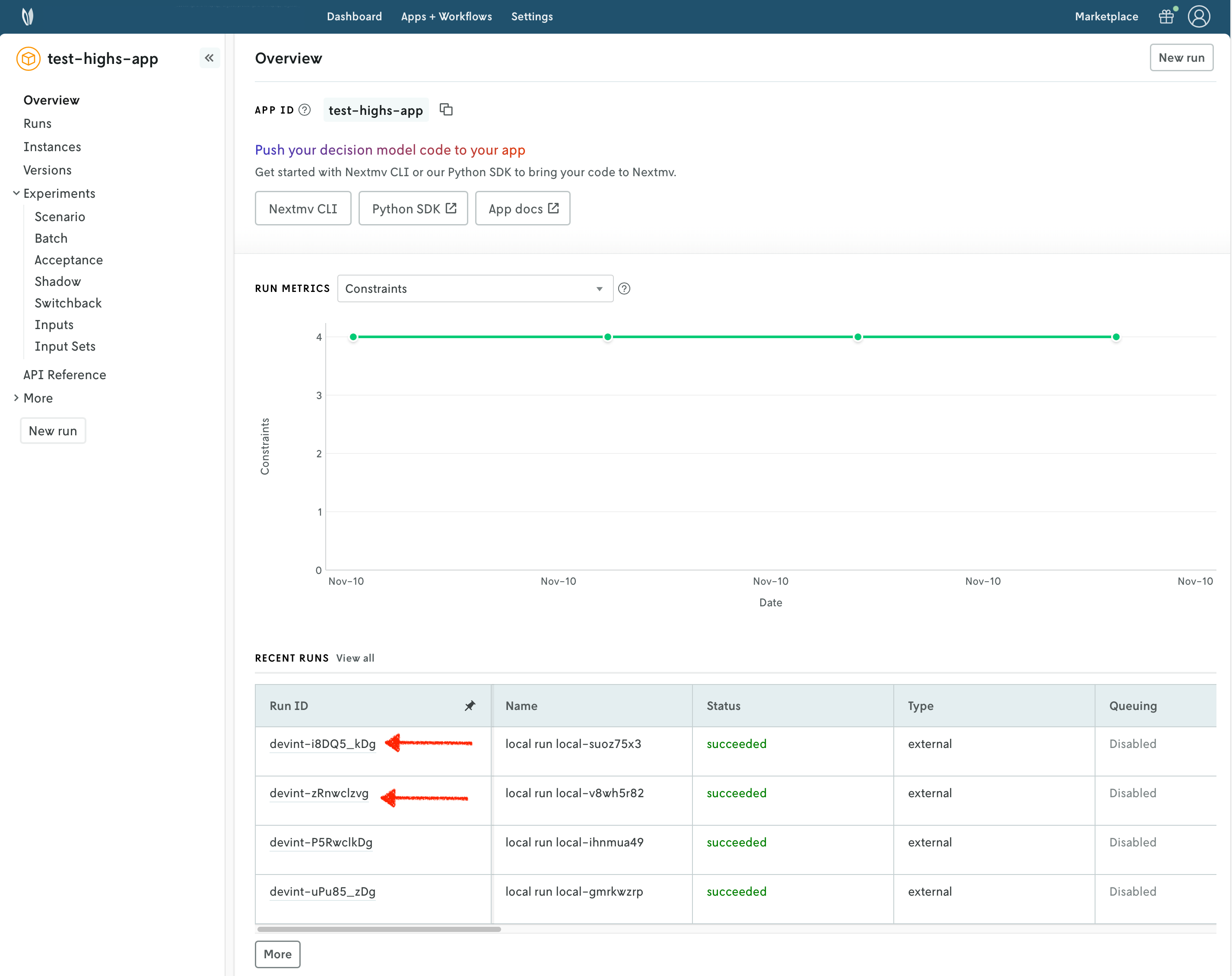
Pushed app

  • There is now a pushed executable.
  • There is an auto-created latest instance, assigned to the executable.

An instance is like the endpoint of the application.

11. Run the Nextmv application remotely

To run the Nextmv application remotely, you have several options. For this tutorial, we will be using the Nextmv Console and CLI.

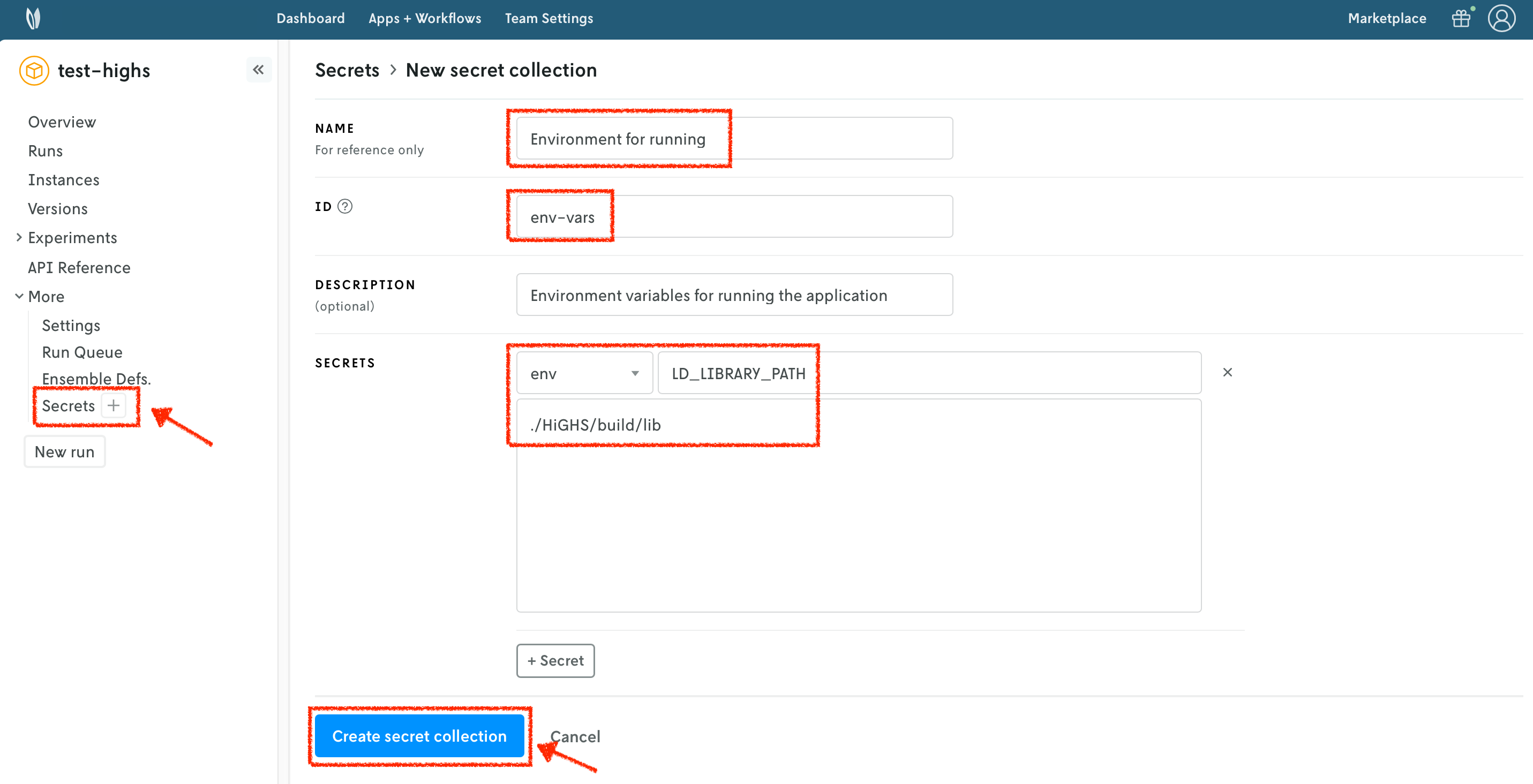
For OR-Tools, there are no special requirements to run. For HiGHS, however, you need to specify the LD_LIBRARY_PATH environment variable, so that the application can find the required shared libraries. To achieve this, you can use secrets collections, which allow you to specify special files or environment variables to be used when running your application.

To create a secrets collection, follow these steps:

  1. Select the Secrets section of your application.
  2. Press the + button to create a new secrets collection.
  3. Specify a name for your secrets collection.
  4. Assign an ID to your secrets collection.
  5. You can optionally provide a description.
  6. Add a new env secret type. The Secret location is the name of the environment variable. The Secret value is the value of the environment variable.
  7. Create the secrets collection.

Secrets collection

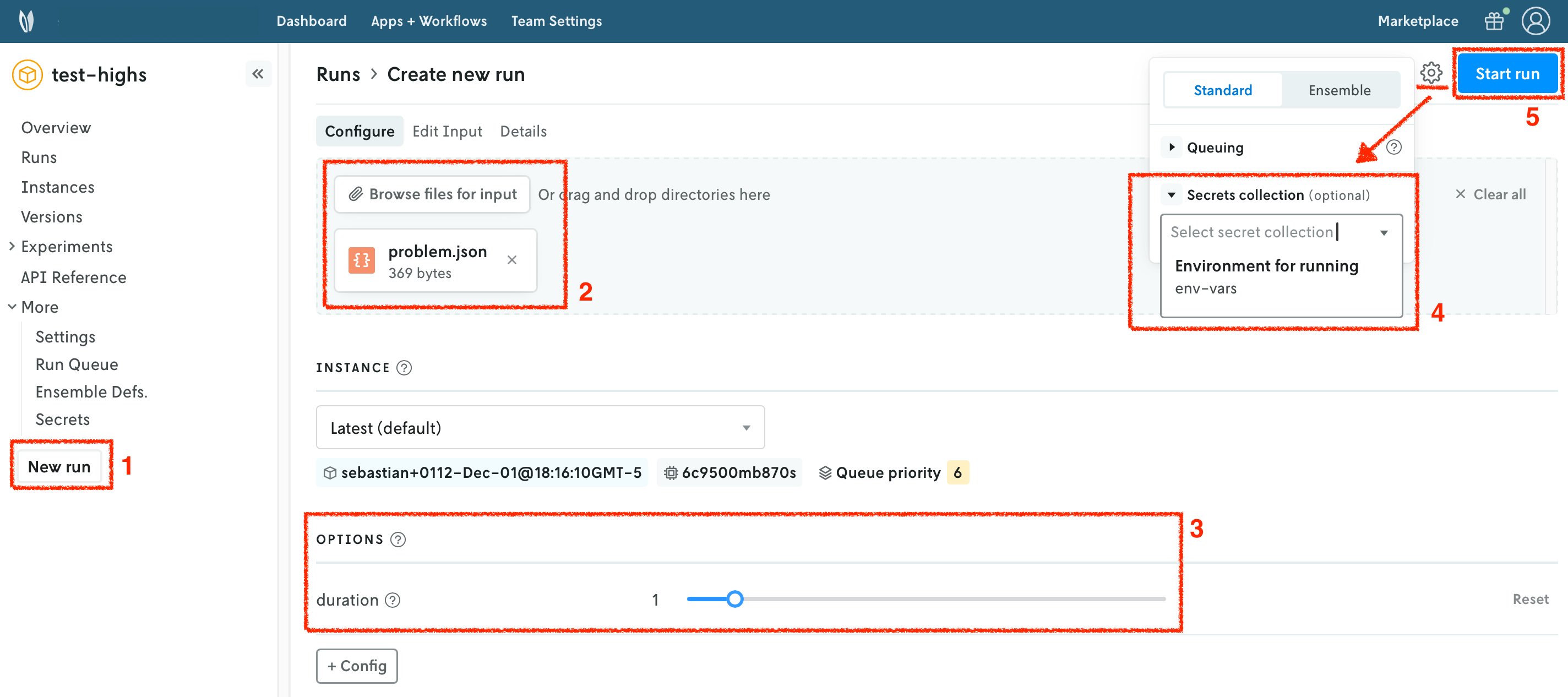
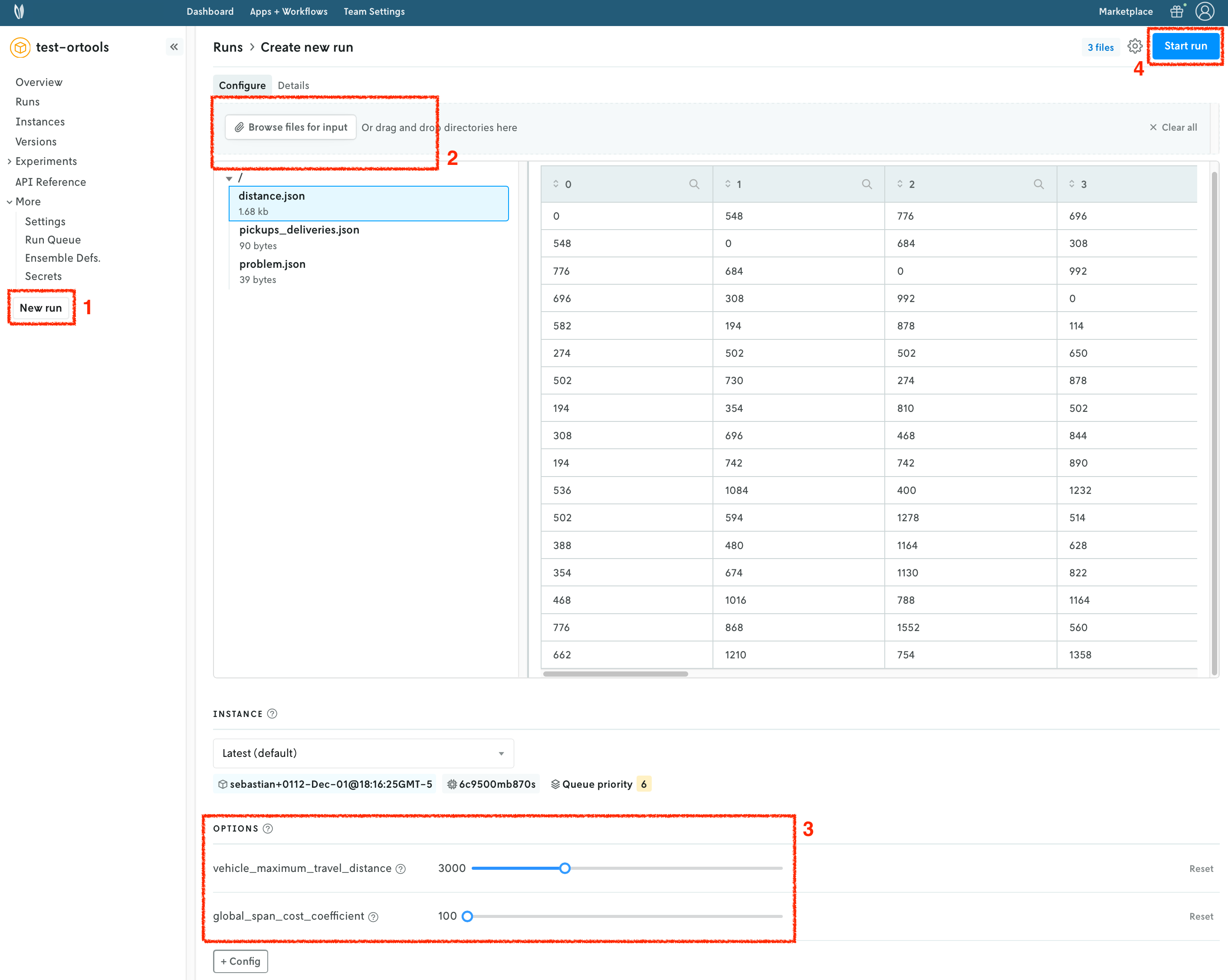
In the Nextmv Console, in the app overview page:

  1. Press the New run button.
  2. Drop the data files that you want to use. You will get a preview of the data.
    • For HiGHS, use the problem.json file.
    • For OR-Tools, use the distance.json, pickups_deliveries.json, and problem.json files.
  3. Configure your run according to the options that are set in the app.yaml manifest.
    • For HiGHS, you can configure the duration.
    • For OR-Tools, you can configure the vehicle_maximum_travel_distance and the global_span_cost_coefficient.
  4. Configure the run settings.
    • For HiGHS, select the secrets collection you created in the previous step.
    • For OR-Tools, there is no special configuration needed.
  5. Start the run.

New run HiGHS New run OR-Tools

You can use the Nextmv Console to browse the information of the run:

  • Summary
  • Output
  • Input
  • Metadata
  • Logs

Nextmv is built for collaboration, so you can invite team members to your account and share run URLs.
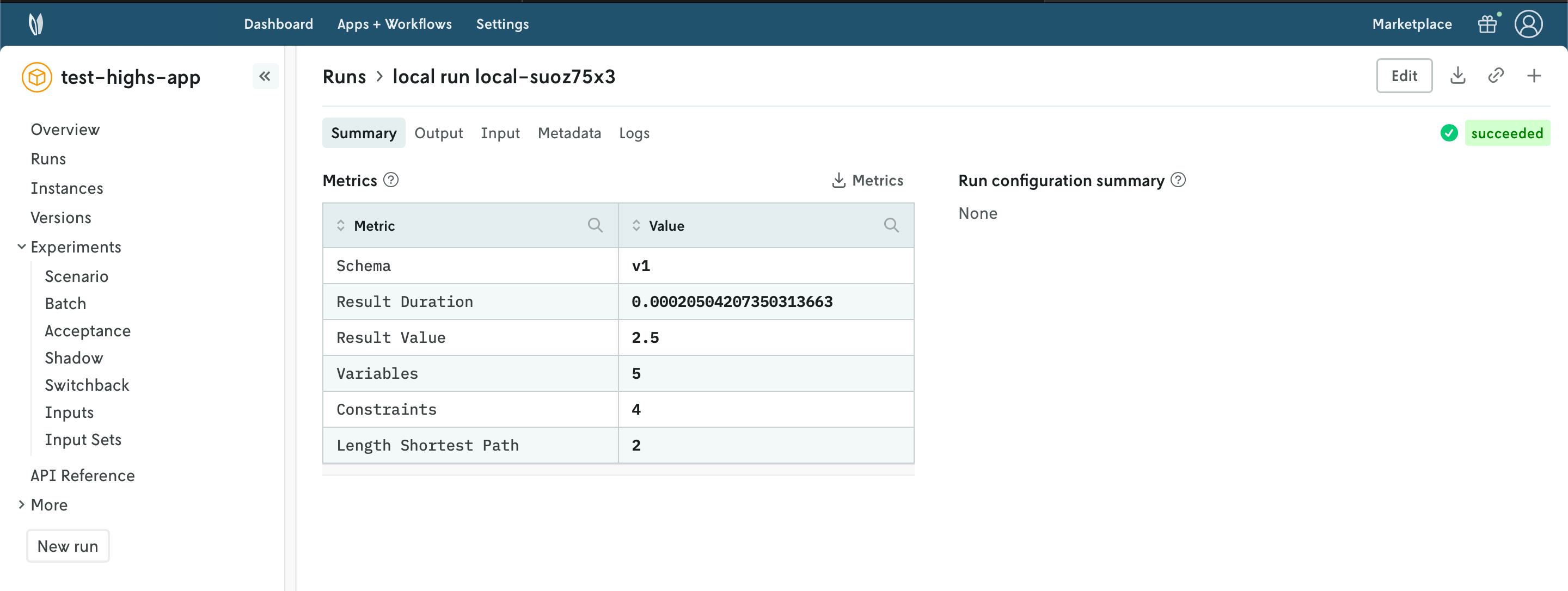
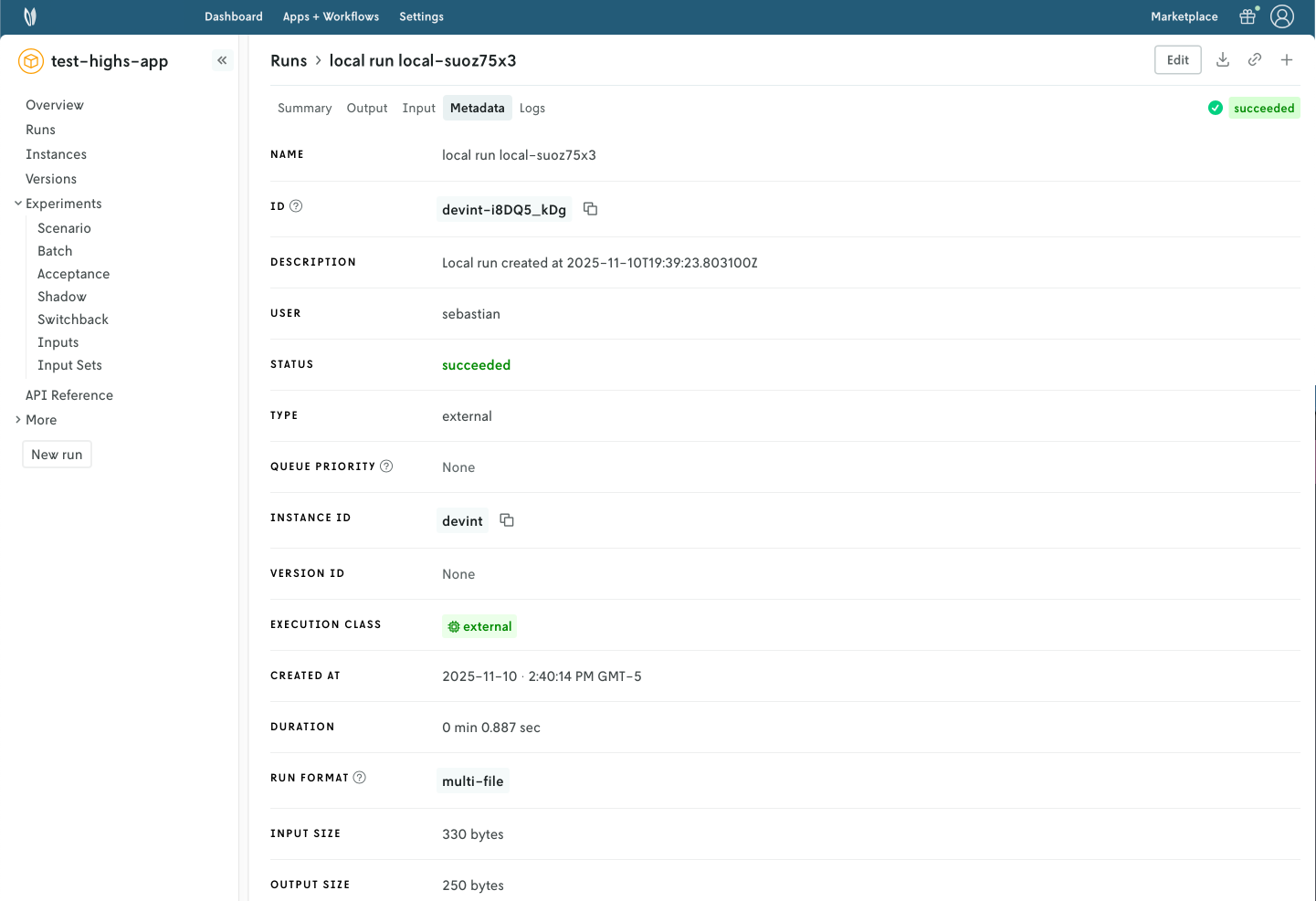
Run summary Run metadata

Alternatively, you can run your Nextmv application using the Nextmv CLI. Here is an example command for both applications.

$ nextmv app run -a test-highs -i inputs/problem.json -o "duration=1" -s env-vars

{
  "run_id": "devint-jjk3M1Zvg"
}
Copy

This command is saved as app3.sh in the full tutorial code.

12. Perform a scenario test

We are going to take full advantage of the Nextmv Platform by creating a scenario test. Scenario tests are generally used as an exploratory test to understand the impacts to business metrics (or KPIs) on situations such as:

  • Updating a model with a new feature, such as an additional constraint.
  • Comparing how the same model performs in different conditions, such as low demand vs. high demand.
  • Doing a sensitivity analysis to understand how the model behaves when changing a parameter.

Start by creating an input set. As the name suggests, it is a set of inputs, and it serves as a base so that we can perform runs varying one or more configurations (options). To create an input set, you have several options. For this tutorial, we will be using the Nextmv Console and CLI. You may follow these steps for both examples.

  1. Navigate to the "Input sets" section.
  2. Set a name for your input set.
  3. Use the "Instance + date range" creation type given that we already have a few runs on the latest instance.
  4. Create the input set.

Input set

Another option for creating the input set is using the Nextmv CLI. Here is an example command for both applications.

$ nextmv experiment input-set create -a test-highs -i latest -s input-set-2 -n "Input set 2"

{
  "id": "input-set-2",
  "name": "Input set 2",
  "description": "",
  "app_id": "test-highs",
  "created_at": "2025-12-02T15:24:35.980849238Z",
  "updated_at": "2025-12-02T15:24:35.980849238Z",
  "input_ids": [
    "latest-BnZOZ1ZDg",
    "latest-5qrIm1ZDg"
  ],
  "inputs": []
}
Copy

This command is saved as app4.sh in the full tutorial code.

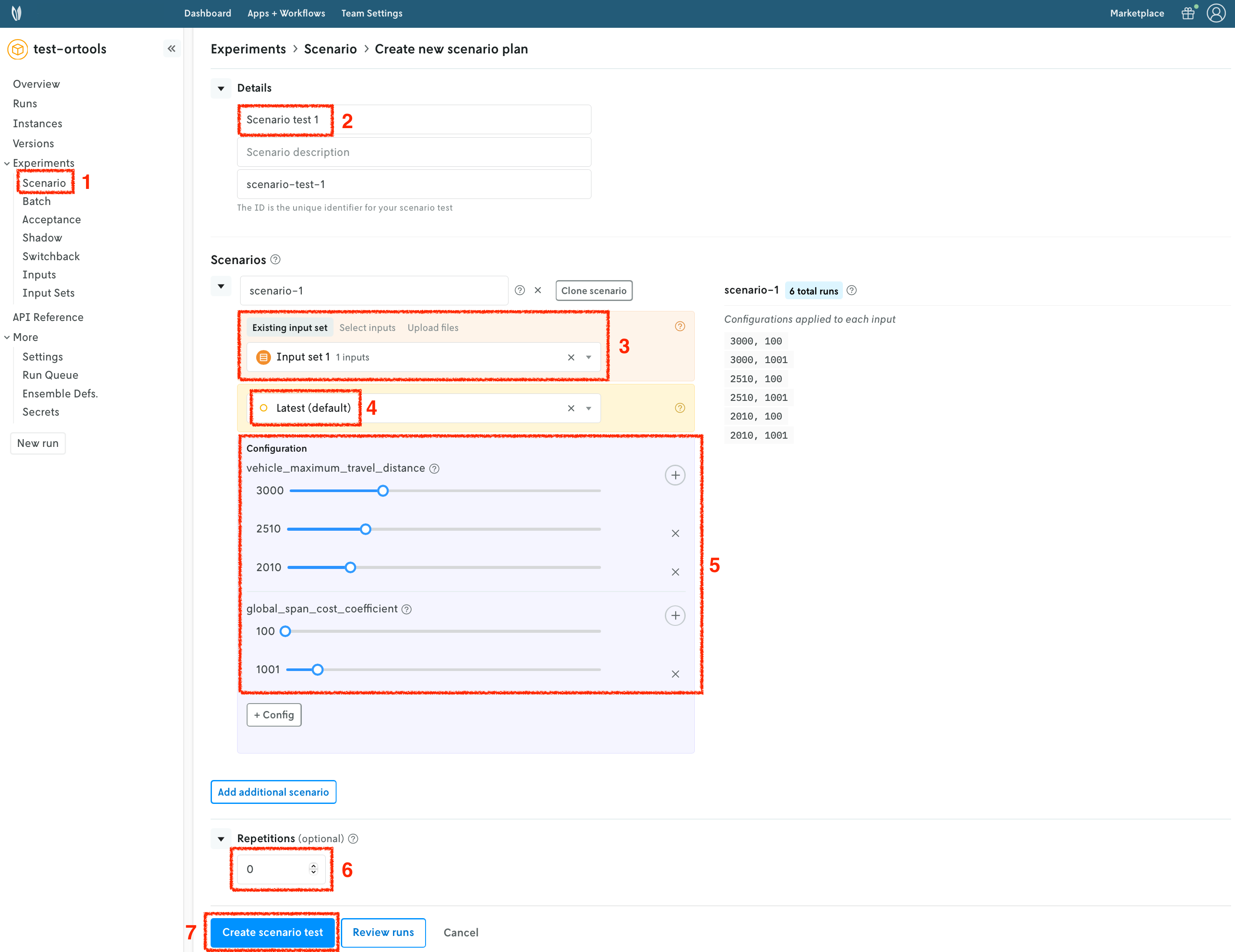
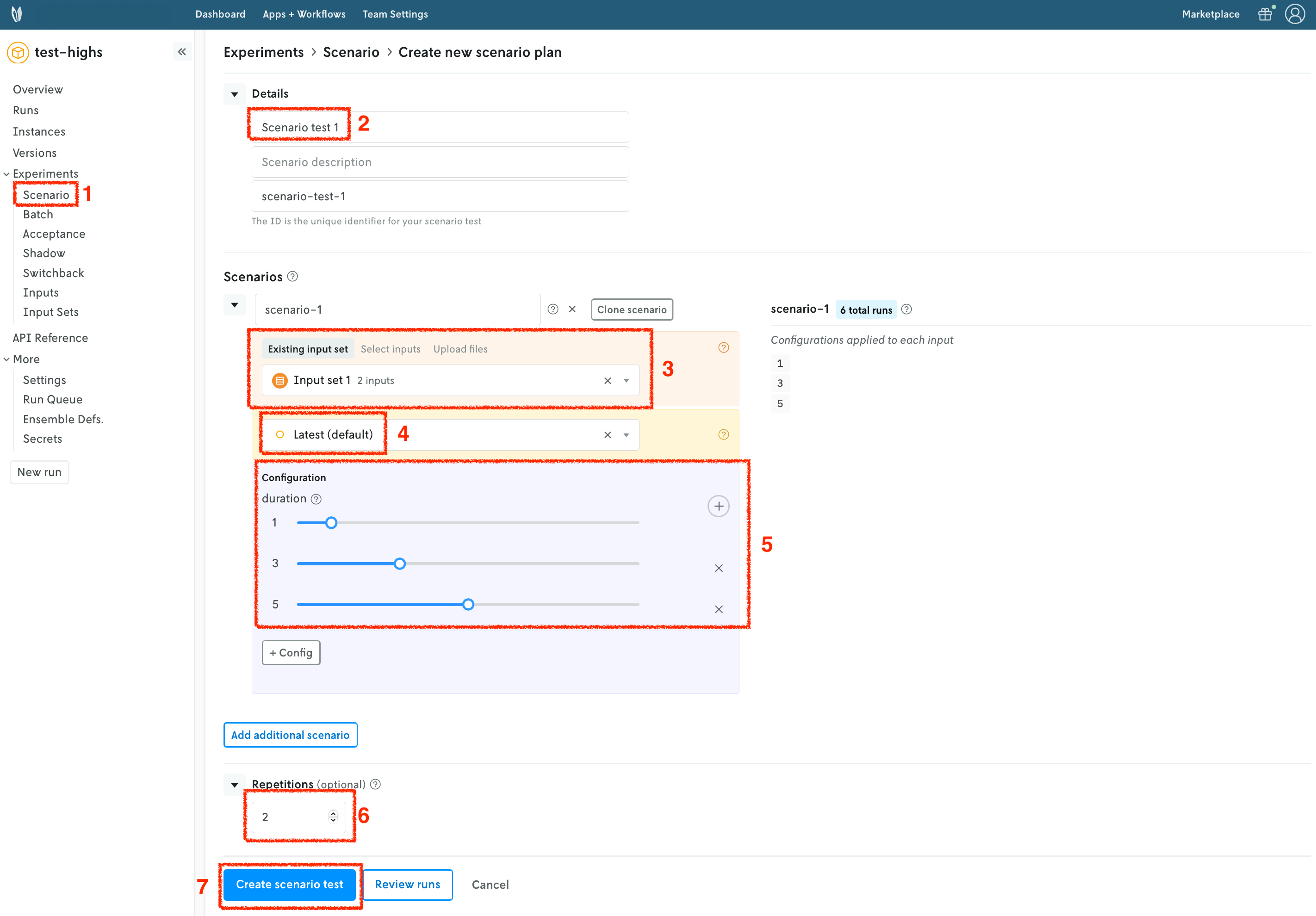
Once your input set has been created, we are going to create a scenario test. Similarly to runs and input sets, you may use the Console or CLI, amongst other options. We will continue to use the Nextmv Console in this tutorial. You may follow these steps for both examples.

  1. Navigate to the Scenario section.
  2. Set a name for your scenario test.
  3. Select the input set you just created in the previous step.
  4. Select the latest instance.
  5. Create configuration combinations, which will be factored in to create the scenarios.
    • For HiGHS, we are setting duration to be 1, 3, and 5 seconds.
    • For OR-Tools, we are setting vehicle_maximum_travel_distance to be 3000, 2510, and 2010; and global_span_cost_coefficient to be 100, and 1001.
  6. Optionally, you may configure repetitions. These are useful when the results are not deterministic.
  7. Create the scenario test. Review and confirm the number of scenarios that will be created.
Scenario test HiGHS Scenario test OR-Tools

Once all the runs in the scenario test are completed, you can visualize the result of the test. A pivot table is provided to create useful comparisons of your metrics (statistics) across the scenario test runs.
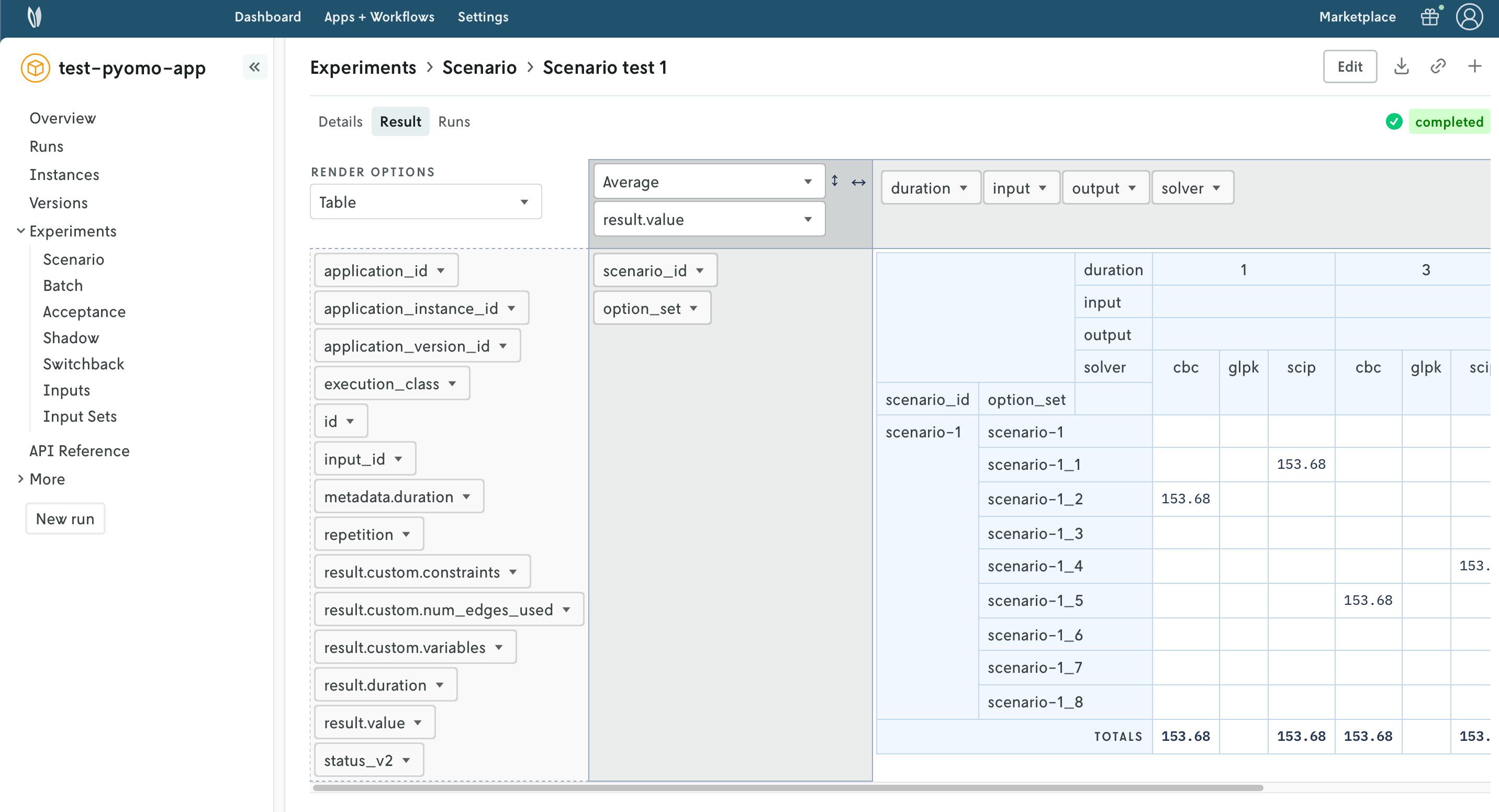
Scenario test result

πŸŽ‰πŸŽ‰πŸŽ‰ Congratulations, you have finished this tutorial!

Full tutorial code

You can find the consolidated code examples used in this tutorial in the tutorials GitHub repository. The connect-your-model-cli dir contains all the code that was shown in this tutorial.

For each of the examples, you will find two directories:

  • original: the original example without any modifications.
  • nextmv-ified: the example converted into a Nextmv application.

Go into each directory for instructions about running the decision model.

Page last updated

Go to on-page nav menu